
Posted by kelvis97 on October 15, 2010 at 12:12pm
That was really interesting, it would have been even better, for me,...
to see the actual site and the wireframes that were created early in the
evolution of the site.
At the site I am going to open soon:
http://www.bluesguitarlessons.info
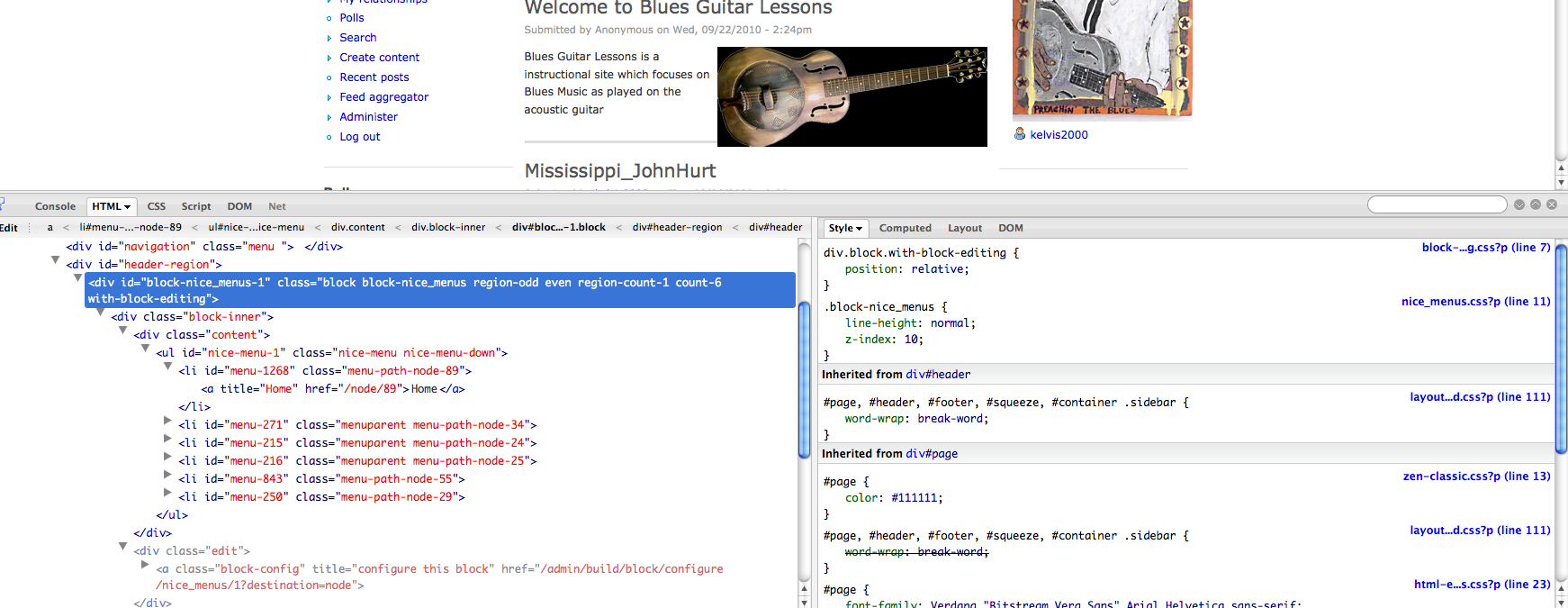
this morning I am using Firebug but can not seem to locate element.style{}
I found,.
<
div id="header-region">
<
div id="block-nice-menus1" class"block block-nice_menus region-odd even region-count-1 count-6 with-block-editing">
Was this added or just edited a bit:
element.style
{
display:table;
margin-left:auto;
width:auto
}
Thanks that was a great meeting
Kevin
| Attachment | Size |
|---|---|
| Screen shot 2010-10-15 at 8.12.00 AM.png | 318.26 KB |
Comments
Chrome versus Firefox
Kevin, when you view an element using Chrome, it labels the 'element' you are using...
The actual css class/id should be used on your site. In this case:
ul.nice-menu a { color: red; }
worked for us.
As for comparing a wireframe to a site built... I didn't have any concrete examples to show of that, I'm sure you can find some online... but in my experience, wireframes should bear little resemblance to the actual site that ends up built, except as the skeleton of what is being built. (Most skeletons look the same, right? But the flesh on top is what makes them different...) It's got minimal/no content, minimal/no theme (no color, no graphics), and should be purely to show functional layouts and as a guide to put all of the rest of the site together.
Centering the navigation
Kevin,
Here's the code we came up with to center your navigation last night...
ul#nice-menu-1 {
margin-right: auto;
margin-left: auto;
display: table;
}
Add that to your custom stylesheet and the UL should center.
And if you want to target the different levels of your menu to use different colors, try this (substitute your own colors, of course)
ul#nice-menu-1 li a {
color: red;
}
ul#nice-menu-1 li ul li a {
color: green;
}
ul#nice-menu-1 li ul li ul li a {
color: orange;
}
Roger
_________________
Art has gone to the dogs
GoodeGallery.com
Thanks
Thats a lot of help, that was one of the best meetups I have been to so far.
Kevin
Thanks,
Kevin
http:www.delta-guitar.info
http://www.Twitter.com/delta_blues
Hi Again
I added this:
ul#nice-menu-1 {
margin-right: auto;
margin-left: auto;
width: auto;
display: table;
}
to the base of the zen-fixed.css,...
I never created a sub theme, it does not seem to be working is that
because I did not add this code properly ?
Thanks for your help
Kevin
Thanks,
Kevin
http:www.delta-guitar.info
http://www.Twitter.com/delta_blues
Line numbers in front of selectors?
Kevin,
I took a look at the CSS file and there are what appear to be line numbers in front of a number of the CS selectors... In this particular case it read:
108
ul#nice-menu-1 {
margin-right: auto;
margin-left: auto;
width: auto;
display: table;
}
If those are--in fact--line numbers, they don't belong in the file itself, unless you were to comment them out, like so:
/* 108 */
ul#nice-menu-1 {
margin-right: auto;
margin-left: auto;
width: auto;
display: table;
}
I'd either comment out all of these numbers, or just remove them. The CSS code is seeing those as part of the selector, and since it isn't actually a part of that CSS element, it's not recognized and the styling doesn't work.
Try removing the 108 in front of ul#nice-menu-1 and you'll see what I mean. It should work with the number removed.
Roger
_________________
Art has gone to the dogs
GoodeGallery.com
Remove all of those numbers
I took a longer look at that CSS file, and it does appear that those are line numbers. They are copied both outside of the declaration brackets {}, making the file see them as selectors--and inside the brackets, making them appear as part of the CSS property or value.
Those numbers are superfluous to the CSS code and will render incorrect or no results.
I hope that helps.
Roger
_________________
Art has gone to the dogs
GoodeGallery.com
Another Elementary question please
When I use Firebug and select the div which is "header" the top block of the page http://www.bluesguitarlessons.info highlights, so I figure the #header {} will affect that area,
I changed the color to a dark blue but the dark blue is a strip at the bottom of this rectangular area instead of the whole block which highlights in Firebug ? Am I doing something wrong or is what I see in Firebug being highlighted not accurate ? The other thing I want to do is drop the Nice Menus to the bottom of the Dk Blue Block, The good news is I added something and was able to view a result, the bad news,...oh well...
Firefox shows a Blue Strip, Safari shows the whole top, header block as being a navy blue which is correct w/ the exception of
2 shades of Blue
Thanks
Kevin
Thanks,
Kevin
http:www.delta-guitar.info
http://www.Twitter.com/delta_blues
Try this
Kevin,
Try adding this to the bottom of your CSS file:
div#header-region {
background-color: transparent;
height: 25px;
}
I don't know why it's set up that way (to have that separate color, and there may be a better way to handle it... But it's what I found when I reviewed it.
And I would definitely remove all those line numbers in the file. It's hard to figure out whats going on in the file with that stuff there.
Roger
_________________
Art has gone to the dogs
GoodeGallery.com
Awesome Thanks
Could color change be related to a few links which were there to the left of the
Nice Menus ? Thats the only difference I could see, but no
longer a problem which is fantastic..
Yesterday I made a change flushed the cache then reloaded the browser,
and did not work...A few minutes later it shows up I guess I needed
to empty the browser cache too.
I understand why you put #header-region into the CSS but not div.
I just bought Sams you can learn CSS and HTML in 24 hours another book to add
to my collection, doing is a lot better than reading.
The "New Users" Block is underneath the block I have the
images cycling which was done w/
views rotator and is another Block, dont know why they overlap.
I set up a RSS feed using a hashtag seeing
as I dont think there are too many good
sources of Blues Storys or news,...
Thanks for your help
Thanks,
Kevin
http:www.delta-guitar.info
http://www.Twitter.com/delta_blues
specificity
The div. isn't necessary but just adds a little more specificity. Honestly, I grabbed the selector for that using CSSEdit and didn't bother to change it. CSSEdit is a great tool and I use it for all my CSS styling and investigating. Just easier for me than firebug--which is great but not as helpful (for me) as CSSEdit.
I can't account for the color that was showing in #header-region , as it didn't seem to be there before you added the deep blue to the header. It may be something buried in another CSS stylesheet that surfaced when the other style was applied?
Roger
_________________
Art has gone to the dogs
GoodeGallery.com
Menu Problems
http://www.bluesguitarlessons.info
Every page w/ the exception of the Home or Landing page, the nice menu appears
below the header block ? I have no idea why this is happening, I think IE 7 does not
format properly either w/ nice menu ending up flush left, not sure if this should even be a concern ?
Thanks
Kevin
Thanks,
Kevin
http:www.delta-guitar.info
http://www.Twitter.com/delta_blues
breadcrumbs
Kevin,
That's the div.breadcrumb showing up and displacing the navigation. I didn't realize it came above the navigation in the theme.
Your options are to:
- turn off breadcrumbs in the theme (easiest... if you don't think you need the breadcrumbs)
play with CSS to try to reposition it (not really a great option, as you'd probably need to position it absolutely, and then there'd be more adjustments elsewhere)
modify the page.tpl.php file to reposition the breadcrumb under the navigation (really best done at a sub-theme level)
Roger
_________________
Art has gone to the dogs
GoodeGallery.com