
Hello. I'm new to OpenPublish and I love the layout and theme and everything about it.
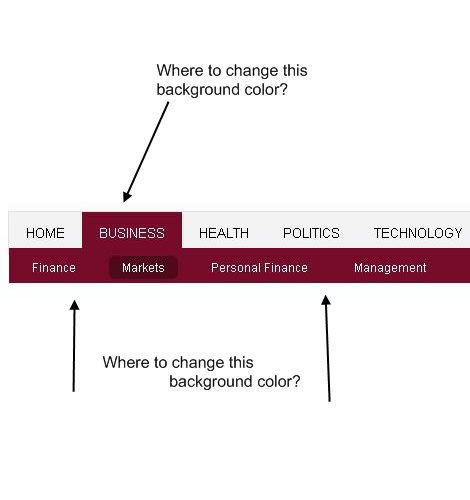
The only problem I have while trying make a subtheme is that I can't find where to change the dark-redish background colour to something else.
Check the image attachment to get the idea easily.
I'm referring to the "current section" highlight of the primary-links menu which has the background #770C2A when selected... and entire set of secondary-links which gets the same #770C2A background. I got the "770C2A" code from the Paint.NET sampler.
The color is controlled by javascript and it changes on mouse over.
I've been searching in the CSS files I can't find any reference to the background color in those areas.
The html output referring to the menus is:
 <li class="first-level on ">
        <a href="/openorasul/?q=articles/Business" class="first-level">Business</a>
class="first-level on"
and
class="first-level"
... I can't find those classes in any CSS file. I do understand that it uses javascript to control the visibility of the menu items, but the colors are a mistery to me :(
| Attachment | Size |
|---|---|
| mistery_red.jpg | 19.88 KB |
Comments
the default menu is not in
the default menu is not in sites/all/themes/*
You have to manually change: sites/all/modules?openpublish_core/openpublish_menu/openpublish_menu.css for the colour to change.
-Ronald
solved
Thank you
Don't change
Don't change openpublish_menu.css! Leave those files alone and whenever possible don't touch files in sites/all. Exceptions would be if you need to modify functionality with those modules, but I would consider moving the module to sites/default if you're making changes to it. CSS changes don't need to be made to the actual module though. That should be done in the subtheme.
@ksweet one of the basics is
@ksweet one of the basics is not putting modules in /sites/default ....
As you can see in the file called openpublish_menu.module if calls strongly to drupal_add_css(drupal_get_path('module', 'openpublish_menu') . '/openpublish_menu.css');
.
The only other option would be to copy the file to sites/all/themes/yourtheme/css/menu.css (or any other name you want) and adjust it.
-Ronald
As long as you're not running
As long as you're not running a multisite installation, there is no reason to say that /sites/default is off limits. What makes the most sense is this setup:
Core modules in /modules
Modules that come with OP in /sites/all/modules
Modules that you write (and IMO add that aren't in OP) in /sites/default/modules
This way everything is kept entirely separate. If core needs to be updated, it won't affect OP or your own changes. If OP needs to be upgraded, it won't affect core or your own changes. So if you ever plan on upgrading OP, it would be wise to make sure that none of your own modifications are in the /sites/all folder that OP is going to overwrite. Basically, this is all a convenience issue when trying to upgrade anything with your system.
Actually, this information is also mentioned in the OP documentation (http://openpublishapp.com/doc/your-first-openpublish-subtheme):
"Typically, in-house themes and modules are placed under "default" and themes and modules downloaded from drupal.org: under "all"."
And I'm not denying that the openpublish_menu.module adds that css file. I'm saying it's a very, very bad idea to edit that file (and an even worse idea to get in the habit of making changes like that). CSS changes should be made in your subtheme, which should be in /sites/default/themes/ anyway.