
Posted by vonfracas on January 28, 2011 at 8:07pm
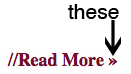
Anyone know where the style is that controls the merlot arrows that follow article title (h2) links in OpenPublish core theme? Or is it a style at all?
| Attachment | Size |
|---|---|
| OParrows.jpg | 41.36 KB |
Anyone know where the style is that controls the merlot arrows that follow article title (h2) links in OpenPublish core theme? Or is it a style at all?
| Attachment | Size |
|---|---|
| OParrows.jpg | 41.36 KB |
Comments
Psuedo element
This is what you are looking for in the html-elements.css:
h2:after {
color: #760C29;
content: ' »';
font-style: normal;
}
If you remove that, you'll be good.
See above.
See above. I fatfingered submission.
Beautiful! Thank you very
Beautiful! Thank you very much.
thank you!
This fix was really helpful. I have a related issue that perhaps you could also help with.
I am using Topic Hubs > Panel Configuration to place a summary article in the center column. I used the Page node type for its simplicity. Now I have two headings showing up for each article. The second one is blank, except for the merlot arrows mentioned above. Can you tell me how to work around this?
I believe it is related to the node attempting to format the title, and Panels attempting to format the title. But I have no idea how to fix it. Can you help?