
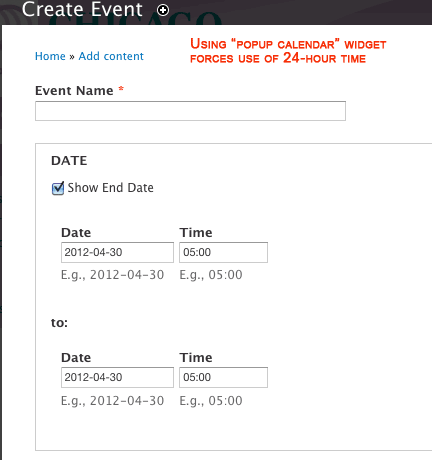
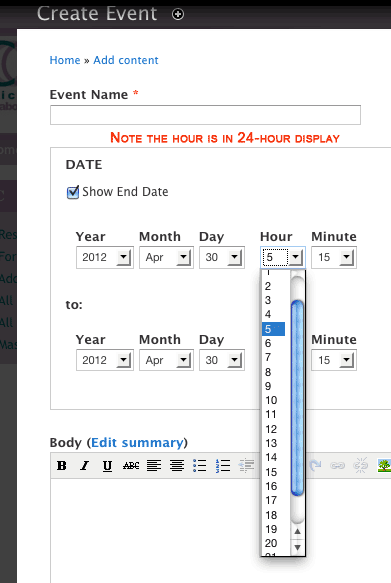
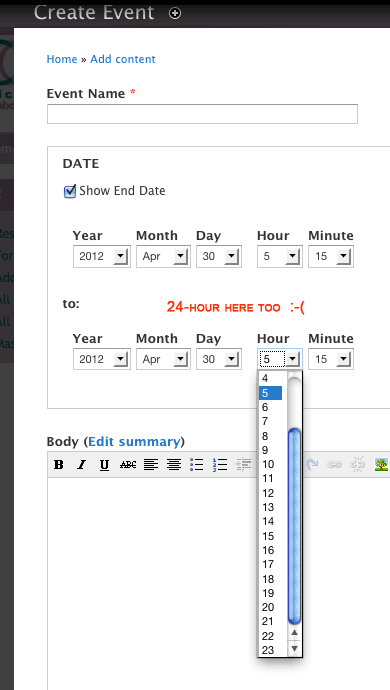
I have created a content type called "Event" and added a "Date" field to indicate the date and time. I cannot seem to force it to display time options in 12-hour instead of 24-hour view, whether I use a "popup calendar" or "select list" widget.
I have the FullCalendar module installed, and my boss likes how it displays the calendar. I have gone into "Administration » Configuration » Regional and language » Date and Time" and created the exact format I want, and given it a "Types" name ("North America: US" which renders as "April 30, 2012, 5:30 am MDT"). Is there a way to get the popup calendar widget to use a different format? Or do I need a different module/library?
I've attached screenshots in case it's helpful.
Any help would be greatly appreciated. I have a final meeting with the Director tomorrow on this, and desperately need a fix. Thanks in advance!
| Attachment | Size |
|---|---|
| screenshotEvent1.gif | 10.95 KB |
| screenshotEvent2.gif | 19.54 KB |
| screenshotEvent3.gif | 19.1 KB |
Comments
You'll want to check your
You'll want to check your settings at
admin/config/regional/date-time
These are the default long, medium, and short formats.
You can add your own formats at:
admin/config/regional/date-time/formats
Then check:
admin/structure/types/manage/event/display > [field] > Format
admin/structure/types/manage/event/fields/[field] > More settings and values > Date Entry
edit: event above is a content type in my case
Thank you!
Thank you, dave! I knew I was missing some minor setting. I may actually have this ready by the deadline now.