
I'm posting this because it's so solvable and yet it causes so much grief.
Try to imagine you've never worked with Views before, and you're pretty daring about trying out new software. Like most of us, you're likely to start throwing things around before you've finished reading the documentation.
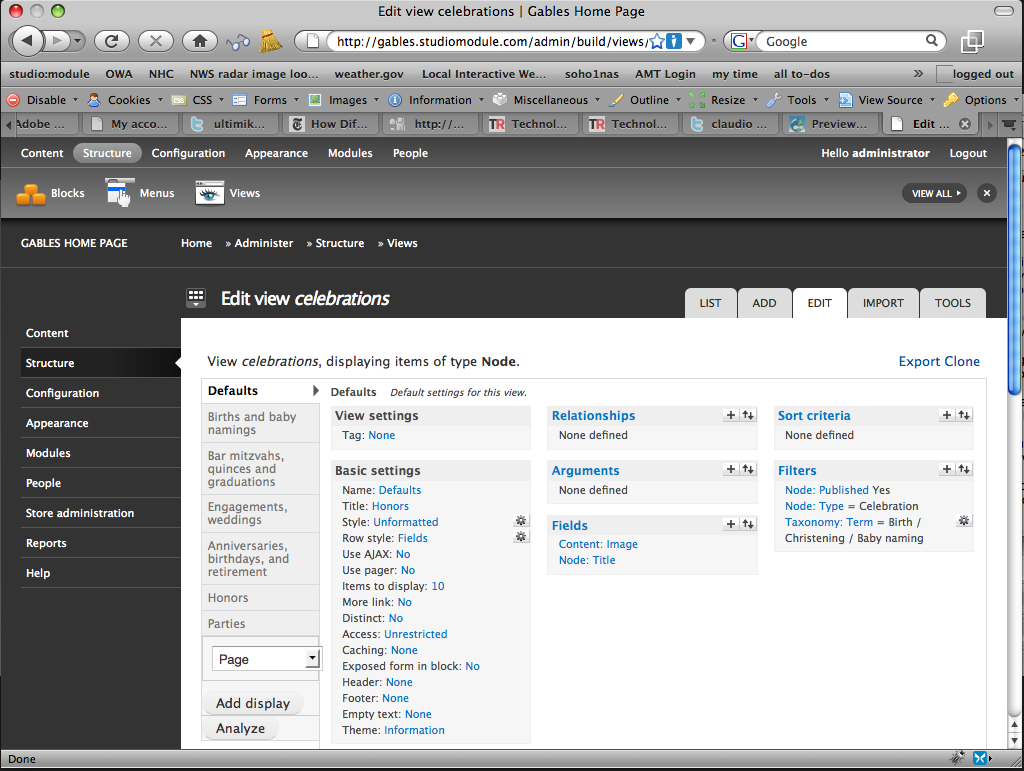
You go to /admin/build/views and see "storage" "type" "tag" with no explanation. You do see a list of views, and you decide to try playing with one of them to see what happens, so you click on the "edit" link.
Now imagine that your browser's window is not fully open. Let's just say it's at 1024x768 with an average amount of chrome.
You click on a "+" sign next to fields. You see the blue AJAX stopwatch. Nothing happens. You click on the up and down arrows. Nothing happens.
You click on a field, say, "Name". Again, you see a blue AJAX stopwatch. It goes yellow. Nothing else happens.
Of course, we all know that your input area is off the screen. A newbie doesn't know that, nor should they have to deduce that.
To resolve this issue, we could:
1) Add a message box that says "scroll down to select a field to add". That's a bit kludgy and requires knowledge of the user's context. or
2) Re-arrange the layout so that the input area is ALWAYS visible on screen. This is by far the preferred route.
Personal note:
This was my first experience with Views out of the box. I've worked in interactive for over 15 years, and I've never seen an application requires the use of controls that are off-screen. Had we left things like this for any of our clients, we'd be fired in short order or our firm would have been sued. I'm glad the Drupal community is more forgiving.
| Attachment | Size |
|---|---|
| views-ui-1.png | 203.09 KB |
Comments
It's on my TODO list to
It's on my TODO list to scroll the form into view if it's not. To be honest I didn't know how to do that when I wrote the UI, and I think I do now.
This is a little easier said than done. We went a long way towards hiding as much info as possible while still making everything accessible. Especially for users who end up with a really narrow screen.
options for rearranging the screen real estate
I've been giving this a ton of thought to figure out how this can be pulled off. I think the difficulty lies in presenting too much information when the application is opened for the first time.
When the user first comes into Views, the views category palettes are all there, and they show all of the available options. You could show the View Settings and Basic Settings open, and all of the others collapsed.
If the views category palettes were in a four-column grid, (not three) you could use the left two for the palettes, and devote the right two columns to forms, dialogs, and help.
Another alternative (which is more standard) is to have the options appear in modal dialog boxes, so that they're never out of sight. You may find that this actually provides us all the greatest flexibility for interface design.
I'll try to get screenshots together to better illustrate this, but it may be a few days.
@modulist
For the 4 column idea: Set
For the 4 column idea: Set your browser to 800px wide. Now add sidebars on the left and right. The UI is almost unusable now, in 3 columns. I'm not sure what 4 columns would do, honestly, but the conclusion I draw is that it would be even worse.
Having collapsing sections adds the cost of extra clicks and the cost of obscuring the location of information. One of the rules I worked with is that I wanted information to be never more than 3 clicks away. LOTS of information is 3 clicks away. This would add a fourth click.
We discussed modal dialogs during the creation of this, and modal dialogs were heavily pushed back against. They also have the downside that they obscure information while editing. It might still be possible to consider them, but understand that there are many people who react very strongly negatively to modals who, for some reason, do not react negatively to the current situation.
I've been trying to figure out if the way Page Manager is set up would work for Views. Unfortunately it doesn't really have the whole vertical tabs for displays, so it can use the categorizing for settings along the left side.
Another option is to have the entire information area swap out with the form, and then swap back in when the form is closed. The real problem with that is that it's very common for me, when building stuff, to short-circuit the flow of forms. For example there's a couple of items that you have to go through 3 forms when adding (and order of information requirements make that difficult or impossible to reduce) and I often know that the defaults on the final 2 forms are ok. So I update the first form and then click on something else to let the other 2 forms do what they will. So this would add more clicks in that situation. Which admittedly is relatively minor. And it has the same issue that modals do, which is that it obscures data you may need while editing a form.
How about a jquery
How about a jquery smooth-scroll to an anchor just above the settings UI. You could provide a setting to turn it off for the people who don't like that sort of thing. I figure if you clicked that gear, plus, or up-down, you probably were going to scroll down anyway. Maybe even provide a scroll-back-up link/icon/button on the settings UI.
I'm in favor of this. The
I'm in favor of this. The only reason it doesn't exist is that when this was in development, I didn't know how to do it.
Criznach, can you do jquery?
If so, Mike and Everett could use help making menus that combine vertical tabs with related form fields accessible. See this issue for more information.
Views 2 ui could definitely
Views 2 ui could definitely be improved. I'm guessing Merlin has a good picture of the main stumbling blocks from the views issue queue. It would be good to summarize these first so that we know which problems we want to design solutions for.
One thing that I think would be helpful is a simpleviews like process for setting up a basic view. Especially how it uses natural language in the ui is really helpful in getting people to understand what this Views thing is about.
Views2 Accessibility
I am definitely in support of any proposal to truely improve the user experience of the Views module. I hope that accessibility is taken into consideration when this process is underway. I am happy to contribute to ensuring that Views is accessible.
One of my questions is, why is one UI used for creating the query and display? Would it perhaps simplify the UI to allow users to create "queries" and then to select a query from a list to use in creating a display?
Accessibility Consultant & Web Developer - Zufelt.ca
@ezufelt on Twitter | LinkedIn profile
why one UI query and display?
I agree completely. As a newbie, i found Views a mess. No clues, no tips, no way to understand what is this all about. As a widely used tool, Views should have an aproach more user-friendly. To separate query-building from display-building is a way to achieve that. Some tips in the old-fashioned way "mouse-over" in the selectors would be great, too.
No mouseovers
In that compact form, mouseovers would be annoying. It's not that hard to click on one of the little question marks if you have a question about what something is.
Michelle
I take that back
Ok, I guess there are mouseovers and I hadn't noticed them. So I guess they weren't annoying after all. :) Still, though, for large blocks of help text, those question marks are nice.
Michelle
No hovertips, indeed
I realize the screencap didn't capture my mouse sitting over the word that's underlined.
This argument is like an American political debate, now, where the facts are irrelevant and all that matters is the rhetoric.
Looks like a good case for testing prototypes
It's really hard to distinguish preference from differences in performance when reviewing features like this. It would be nice if we could develop some prototypes and get some participants for usability tests of them. In my experience, that has settled lots of otherwise interminable — um, discussions.
Yeah, that's right, we were just discussing options. Loudly. ;-)
Courage Merlin
@merlinofchaos I don't how you can be so patient with newbies constantly coming at you with their acid critics and ideas, and take the time to explain to them that their ideas have been thought about before, that if you step back a second, things make sense, and that Views might be complicated, but it's because it does so much that having as simple interface is as complicated as creating the software itslef.
If it was me, I would have probably slammed the door several times (but that might be because of my french mood...)
I use Views 2 everyday, and it has never been an obstacle to productivity. There is a learning curve, of course, but same goes for everything that is powerful, like photoshop, illustrator, or even Word.
Great work Merlin, and can't wait to see where Views 3 is going to be !
great work indeed
I've no doubt Merlin has done a great job, and Views is indeed one of the best contributor's feature i ever seen in Drupal, and i think it should be in the core for the next release. That's not the point. The point is that is really hard to figure out what Views really are and do in a glance. I did read everything i could, watched a good video about it, and it's still hard to work with that. It's not anybody's fault, but i think it's just a matter of how to organize things in a certain way to get the best from it. I'm not a programmer (shame on me) so i can't help directly in the project instead of just complain. But in the matter of facts, CMS isn't all (ok, not ALL) about "programming for non-programmers"?
The only issue i can tell about Views is the interface. I'll try to help if i can, as soon as i learn enough about it. And sorry for my previous post, it really was a bit annoying.
Hidden options
Another thing to consider are the hidden options:
From http://drupal.org/node/534680
The idea is basically add an icon in order to distinguish expandable elements and which options are dependant from another ones.
An screenshot for this:
Mariano D'Agostino
http://cuencodigital.com