
Posted by blanesworld on December 2, 2009 at 12:48am
Hi,
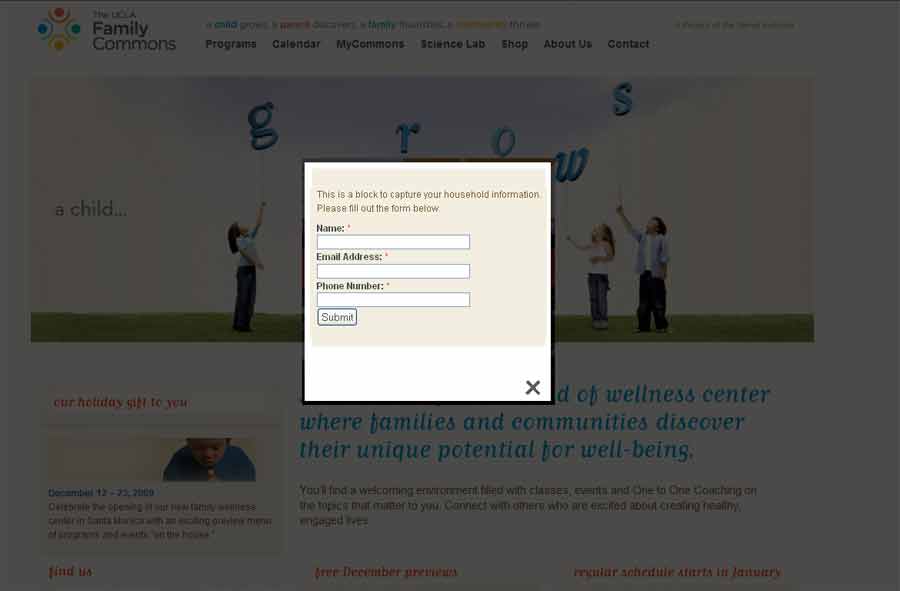
Does anybody have any ideas on how to create a form that pops up in lightbox? I am using Drupal 6, webforms and lightbox module. Ideally only the form fields should show in the lightbox as opposed to the entire web page (see attached). Webforms is ideal since I am using the Saleforce module in conjunction.
Any insight would be fully appreciated.
Thanks a bunch.
D
| Attachment | Size |
|---|---|
| lightbox_form_mock.jpg | 16.34 KB |
Comments
modalframe
http://drupal.org/project/modalframe
I've tried this many times with popups api but it always ended up being a larger headache than i imagined. I have much higher hopes for modalframe
Try the Chaos Tool Suite
Try the Chaos Tool Suite 'ctools'. After installing the module you get an easy to use tool to throw forms into modal windows http://drupal.org/project/ctools.
Solved Using Themekey Module
Thanks all,
I didn't have time to look into Modal. To quickly resolve this situation, I created a workaround involving the Themekey module. I set all webform url aliases to a basic blank theme (I used Foundation theme). The result is exactly what I wanted, simple webforms in lightbox.
Themekey
http://drupal.org/project/themekey
Foundation Theme
http://drupal.org/project/foundation
Hope this information is helpful to people in the future - It was relatively painless.
D
Zen Theme
I usually use the zen theme and then just apply special css rules on the page myself. So you just apply certain rules to the particular page or section by using the body tags attached by the theme. Then I would (through javascript) add a class to the next available element (div#page) so I know if javascript is enabled. So you have a bunch of rules that looks something like:
.node-xxxx .javascript .xxx{ display:none }
The .javascript is added by jquery to the #page element, so that way if the user doesn't use javascript the page will look normal. The main problem I currently see with your current solution is that if the user doesn't have javascript they will be linked to a blank page with no navigation back to your site.
I applied a solution like this recently to a site I programmed here: http://yourrancher.com/newsite if you click on the link 'Where is my ranch code?' you'll get a lightbox that is styled correctly. Then if you disable javascript (through the developers toolbar in Firefox), you'll see that page is styled like the rest of the site.
Hope that helps...
Popups
I just stumbled across the "popups" module today, I don't know if you're aware of it? It's fairly simple to integrate...
dear intlcool... i think you have done the follwing steps rite?
i almost wanted this. i did this At last i could make such a thing but I used "Liightbox2" instead of "thickbok"
Hope you know that both are almost same..
Instead of putting some code, i suggest the deletion of code here ... he he (actually if you are not interested in the coding side please avoid that step)...anyway
May i write the steps i followed
2.In the display settings i checked the both "exclude" for teaser node view and full node view
4.In the fields select the content
5.Select the image field that you created in step one
6.select "link this to it's node" select "Light2iframe :Original->node page.
7.give the filter settings node type :webform . save the view
8.please remember to select the block display or page display
9.install "content theme"
.
10.create a webform .upload your image in the upload field
11.select a different theme for this node view ex :"blue marine"
12.in the page .tpl of "bluemarine" you need only the
so delete all other in that with in
< body>
<?phpprint $content;
?>
please leave the rest untouched..
this is amazing. great job!
this is amazing. great job!
You can use the popups
You can use the popups module, here is a nice screencast on How to display the Drupal Contact form in a Nice Ajax Popup
Totally the easiest way!
Totally the easiest way!
You can use lightbox, rel="lightmodal"
You can use lightbox and webforms, with rel="lightmodal", and a couple of simple customizations to node.tpl.php and lightbox.js, as described here:
http://www.erikhedin.com/web-design/drupal-tips/Easy-Ajax-Nodes-Lightbox...
I found the link in this comment.
Screencast
Hi, here is link to my screencast called "Drupal webform module to lightbox popup for feedback" with all necessary code:
http://www.jasom.net/blog/drupal/drupal-webform-module-to-lightbox-popup...
Alternatively, you can watch it here:
http://blip.tv/file/4017499
Or just use lightbox2
If all you are looking to do is display the node without all the blocks and other parts of the page, use this HTML:
The /lightbox2 will suppress everything but the node content and site logo. So you get all the look and feel of your site without all the blocks and extra content in the popup. If you are using webforms, you will probably also want to have a redirect page that uses the same trick.
Here is a live example FWIW
You can visit Doug Vann's contact form to see a live example at
http://dougvann.com/contact-doug-vann
The above link takes you to the actual node (not a popup). If you click on the link in the header, it will appear in a popup.
I haven't inspected his site to figure out how he is doing it.
It's using
It's using http://drupal.org/project/popups
Solved for me
@jasom
i know i am too late in this thread but thanks for your comment as it solved and save my time
Drupal Dubai Meetup