
We are running our intranet on a webhosting provider. At first, the provider did not have our requirements at all (some Drupal requirements not possible on a shared hosting because it might affect other customers on that hosting). So paid him more to move from a shared hosting to an own server.
However, when we now had our first intranet training, and 5-10 users tried to login the same time, suddenly the server seemed to be down. I am not sure if the server was really down, but it was not possible to get any server response. Always timeout. After a while, at least a Drupal "Site in maintenance mode" message came up. I could get the FTP server responding as well as open phpMyAdmin.
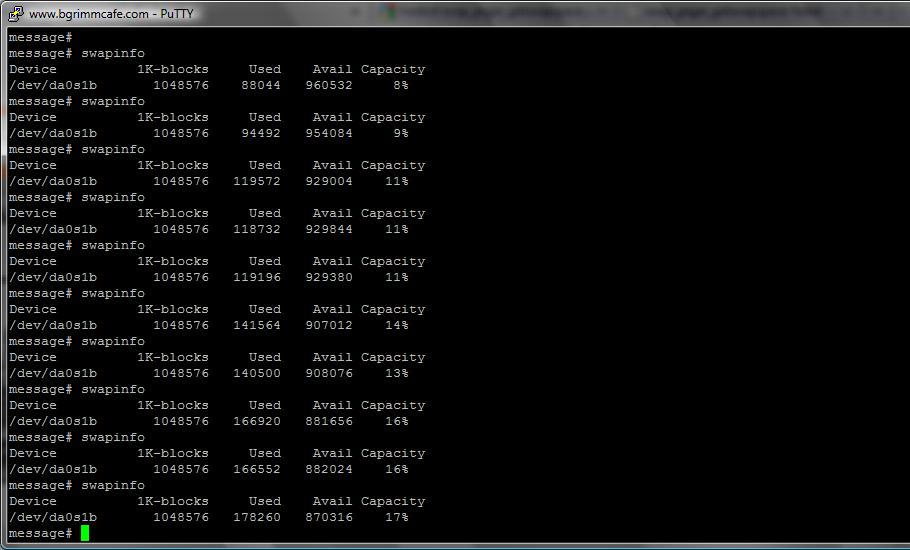
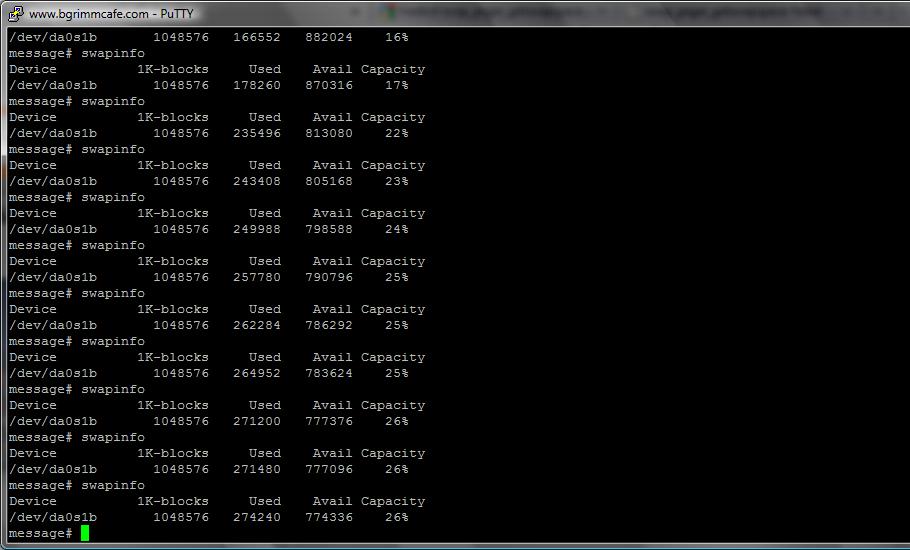
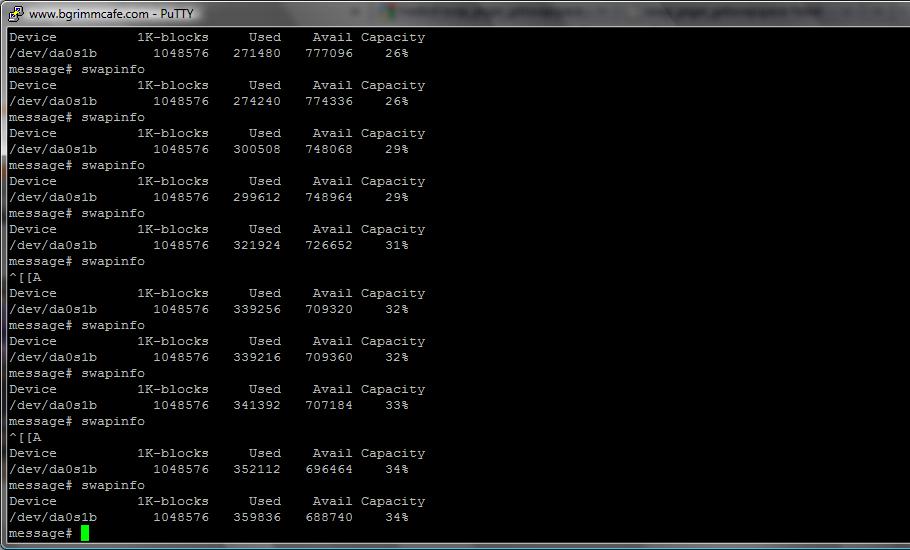
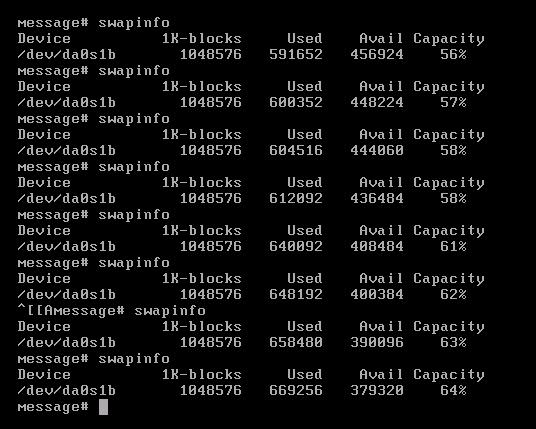
Our hosting provider tells us it is not an issue with the server but with our system/software, i.e. Drupal, but I cannot believe that because we are running a standard Drupal 6 installation with CCK, Views, etc. They monitored the system while we were trying to login with many users. According to them, the swap file (2 GB) gets used up to 70% while it should only be 10% or so normally. So they argue it is our software which is not correct. Please see the attached files of their report.
Additional information:
- The maintenance screen showed "The MySQL error was: Too many connections." as the reason (as far as I remember; is there any log file to look into?)
- In phpMyAdmin I can see a lot of tables are marked having "Overhead" in particular "cache_form" (24.8 MiB) and "watchdog" (22.7 MiB); in total: size is 63.8 MiB plus overhead is 49.1 MiB
- Doing a "Check Table" on all table before returned "1 client is using or hasn't closed the table prope..." or more for many tables (now, however, it seems to be gone)
Can someone help why this could happen?
| Attachment | Size |
|---|---|
| 100525 swap-1.jpg | 63.99 KB |
| 100525 swap-2.jpg | 65.68 KB |
| 100525 swap-3.jpg | 63.37 KB |
| 100525 swap-4.jpg | 54.17 KB |
Comments
Hmmm ... Whats your max
Hmmm ...
Whats your max connection value? But beside that it should never get into swap for 5-10 users .... there is something wrong with your server configs. The site goes in maintenance mode when the db is not reachable but then its a big question mark why phpmyadmin is working.
What does the mysql / apache log files say?
Patrick Przybilla
Drupal Rocks !!!
Thanks for your help Patrick.
Thanks for your help Patrick. How can I get the information requested, i.e. the max connection value, mySQL and Apache log files? Do I need root/SSH access?
max connection value
this can be gotten from the dbtuner module
admin/settings/dbtuner/mysqltuner
Output from my home computer
Connections% connections used: 0.662251655629
Max connections used: 1
Max connections limit: 151
% aborted connections: 0
rate of aborted connections: 0 per day
% aborted clients: 40
rate of aborted clients: 16.9411764706 per hour
Edit: Actually pasting the output from that page would be helpful.
The output similar to
The output similar to mikeytowns would be helpful ... otherwise phpmyadmin should tell you max connections as well.
for the apache or mysql logs you need to have root / ssh access I believe. Depends on what OS you re running there it can be found in different places.
Patrick Przybilla
Drupal Rocks !!!
Thanks both for your help.
Thanks both for your help. Below you find the results from dbtuner module (btw, should I de-install the module later on, or does it have any other features why I should have it enabled?):
 Queries
Uptime in seconds: 121800
Uptime: 1d 9h 50m 0s
Questions: 118427
% slow queries: 0
slow query rate: 0 per day
Long query time: 10
long_query_time is set to 10 seconds or more. This may not be appropriate for your environment.
    (long_query_time >=10)
    (10.000000 10>=10)
Slow query logging: OFF
Enable the slow query log to troubleshoot bad queries.
    ("log_slow_queries" eq 'OFF')
    ("OFF" OFF=== 'OFF')
% reads: 51.616701385744
% writes: 48.383298614256
qps: 0.97230706075534
reads per sec: 0.36614802953434 per day
writes per sec: 0.34321157637699 per day
Queries: 58.33842364532 per minute
Connections: 3 Thousand
Bytes sent: 400 Million
Bytes received: 35 Million


versions
Supported Version: 5
Release Series: 5.1
Minor Version: 40
Distribution: FreeBSD port: mysql-server-5.1.40
Distribution: FreeBSD port: mysql-server-5.1.40

MySQL Architecture: i386
MySQL is not compiled as a 64-bit package.
    ("version_compile_machine" !~ /64/)
    ("i386" dbtuner_strnistr('i386 ', array('64')))


Query cache
Query cache efficiency (%): 80.776928266247
% query cache used: 65.871858596802
The query cache is not being fully utilized.
    (Qcache_free_memory / query_cache_size * 100 <80)
    (11051464 / 16777216 * 100 65.871858596802<80)
Query cache low memory prunes: 0 per day
Query cache size: 16.0 Mb
Query cache min result size: 1.0 Mb
The max size of the result set in the query cache is the default of 1 Mb. Changing this (usually by increasing) may increase efficiency.
    (&hr_bytes(query_cache_limit) eq "1.0 Mb")
    (dbtuner_hr_bytes(1048576) '1.0 Mb' === "1.0 Mb")


Sorts
Total sorts: 3014
% sorts that cause temporary tables: 0
rate of sorts that cause temporary tables: 0 per day
sort_buffer_size: 1.0 Mb
read_rnd_buffer_size: 4.0 Mb
Sort rows: 15.971428571429 per minute
There are lots of rows being sorted. Consider using indexes in more queries to avoid sorting too often.
    (&hr_bytime(Sort_rows/Uptime_since_flush_status) =~ /second|minute/)
    (dbtuner_hr_bytime(32422/121800) dbtuner_stristr('15.971428571429 per minute', array('second', 'minute')))

Joins,scans
rate of joins without indexes: 1.1029556650246 per minute
There are too many joins without indexes -- this means that joins are doing full table scans.
    (&hr_bytime((Select_range_check + Select_scan + Select_full_join)/Uptime_since_flush_status) =~ /second|minute/)
    (dbtuner_hr_bytime((0 + 2139 + 100)/121800) dbtuner_stristr('1.1029556650246 per minute', array('second', 'minute')))
rate of reading first index entry: 21.270443349754 per minute
The rate of reading the first index entry is high; this usually indicates frequent full index scans.
    (&hr_bytime(Handler_read_first/Uptime_since_flush_status) =~ /second|minute/)
    (dbtuner_hr_bytime(43179/121800) dbtuner_stristr('21.270443349754 per minute', array('second', 'minute')))
rate of reading fixed position: 14.779310344828 per minute
The rate of reading data from a fixed position is high; this indicates many queries need to sort results and/or do a full table scan, including join queries that do not use indexes.
    (&hr_bytime(Handler_read_rnd/Uptime_since_flush_status) =~ /second|minute/)
    (dbtuner_hr_bytime(30002/121800) dbtuner_stristr('14.779310344828 per minute', array('second', 'minute')))
rate of reading next table row: 3.2516666666667 per second
The rate of reading the next table row is high; this indicates many queries are doing full table scans.
    (&hr_bytime(Handler_read_rnd_next/Uptime_since_flush_status) =~ /second|minute/)
    (dbtuner_hr_bytime(396053/121800) dbtuner_stristr('3.2516666666667 per second', array('second', 'minute')))

temp tables
tmp_table_size-max_heap_table_size: 0
tmp_table_size: 16.0 Mb
max_heap_table_size: 16.0 Mb
% temp disk tables: 43.432494279176
Too many temporary tables are being written to disk. Increase max_heap_table_size and tmp_table_size.
    (Created_tmp_disk_tables / (Created_tmp_tables + Created_tmp_disk_tables) * 100 >25)
    (949 / (1236 + 949) * 100 43.432494279176>25)
temp disk rate: 28.049261083744 per hour
temp table rate: 36.532019704433 per hour


MyISAM index cache
MyISAM key buffer size: 256.0 Mb
max % MyISAM key buffer ever used: 0.34294128417969
MyISAM key buffer (index cache) % used is low. You may need to decrease the size of key_buffer_size, re-examine your tables to see if indexes have been removed, or examine queries and expectations about what indexes are being used.
    ((Key_blocks_used)key_cache_block_size/key_buffer_size * 100 <95)
    ((899)1024/268435456 * 100 0.34294128417969<95)
% MyISAM key buffer used: 11.857223510742
MyISAM key buffer (index cache) % used is low. You may need to decrease the size of key_buffer_size, re-examine your tables to see if indexes have been removed, or examine queries and expectations about what indexes are being used.
    ((1-Key_blocks_unusedkey_cache_block_size/key_buffer_size) * 100 <95)
    ((1-2310611024/268435456) * 100 11.857223510742<95)
% index reads from memory: 99.958481913593


other caches
table open cache size (5.1+): 256
Size of the table cache
    (table_open_cache >-1)
    (256 256>-1)
rate of table open: 6.2955665024631 per hour
% open files: 2.7309598918432
rate of open files: 8.9556650246305 per hour
Immediate table locks %: 99.736768542676
Table lock wait rate: 3.3399014778325 per hour
thread cache: 8
Total threads created: 601
thread cache hit rate %: 0.15434001027221
Threads that are slow to launch: 0
Slow launch time: 2


Connections
% connections used: 10.596026490066
Max connections used: 16
Max connections limit: 151
% aborted connections: 0.51361068310221
rate of aborted connections: 14.187192118227 per day
% aborted clients: 0
rate of aborted clients: 0 per day


InnoDB
Is InnoDB enabled?: YES
% innoDB log size: 62.5
InnoDB log file size is not an appropriate size, in relation to the InnoDB buffer pool. Consider changing either\ninnodb_log_file_size or innodb_buffer_pool_size
    (innodb_log_file_size / innodb_buffer_pool_size * 100 >=0)
    (5242880 / 8388608 * 100 62.5>=0)


other
MyISAM concurrent inserts: 1

INSERT DELAYED USAGE

Delayed_errors 0

Delayed_insert_threads 0

Delayed_writes 0

Not_flushed_delayed_rows
MySQL doesn't have any Major issues
I don't see any major issues here... I would look at apache. Whats your max memory setting at?
admin/reports/status
PHP memory limit
How much ram is on the box?
Whats your max memory setting
Under admin/reports/status it says: PHP memory limit 128M. I think we requested that because the Drupal handbook says it should be at least that amount of memory. Do you think that could be the reason? What other Apache information should I look at or ask our hosting provider for? Btw, there are several other customers running on the same server as it seems, and their pages seem to run very slow too.
I will ask our hosting provider for that information.
You could also run xdebug
You could also run xdebug profiler for your install and see where the resource consumption come from.
You could also run xdebug
dishui, since I do not have root access to our hosting, but only FTP and mySQL, I have to ask our hosting provider to install/run xdebug profiler, right? Or is there any other way?
Just as another thought here,
Just as another thought here, how many rows are there in your sessions table?
When I first launched my site live, there was a problem with mod_expire and my cookies were not expiring. Before long I had about 8million rows in my sessions table and users were getting up to 45 second page load times during peak hours.
Then it started locking up my DB and giving me the site offline message regularly as the table grew bigger and bigger.
I never did figure out what I was doing wrong in my settings.php, but I found the much better solution for me was the Session Expire module. My authenticated users can stay logged in, and the anonymous users get cleaned up regularly. For me, with about 6K registered users and 10K anonymous visits per day, this works out wonderfully.
It sounds like the database is spiking heavy during login, so sessions table sounds like a possibility, especially if your site was running for a long time and could have built up a huge sessions table.
Just as another thought here,
At the moment, the session table has 19 rows. We have ~400 users at the moment and only some test nodes. Since we did not really go live yet but are still testing there isn't much in the database at all.
Is anyone of you aware of a
Is anyone of you aware of a good Drupal host which offers some kind of test account so that we could run our intranet on that account to proof that the issue must be due to the server configuration? More general, what would you suggest if we cannot fix the issue with our current hosting provider? Our company is located in Bangkok, so we decided to go with a hosting provider in Thailand rather than looking for some Drupal-specialized company which might be located somewhere else.
Web hosts.
I dont know a host which would provide test account but as far as hosting providers go, you would think that since your customers are in thailand, india so lets get a provider from the same region and would give u better performance etc but most often I have found that hosting technology is just not advanced in these areas and sometimes you can also blame it on the infrastructure (network pipe, hardware cost) not conducive to hosting. I have found them to be overselling their servers without adequate infrastructure to compete on prices. I still dont consider indian providers for my needs to be adequate for the same reasons and often use hosting providers from the west (Rackspace and Amazon EC2 which are not really hosting providers).
Dipen Chaudhary
Founder, QED42 http://www.qed42.com Drupal development
I would also look at getting
I would also look at getting away from *BSD. Running servers on it can be a nightmare and there always seems to be little problems that popup (one being MySQL connection nightmares). CentOS/Fedora or Ubunutu/Debian are much better solutions.
HollyIT - Grab the Netbeans Drupal Development Tool at GitHub.
Indeed
BSD is indeed a beast and a bear to run. I guess that's the price you pay for additional security.. provided you don't use the ports. I personally always stick with Ubuntu strictly because of it's ease of management.
Michael Lustfield
Ubuntu Member, Nginx Hacker
As someone who has had great
As someone who has had great success running servers on FreeBSD, I strongly object. "MySQL connection nightmares?" I've encountered no such thing.
The BSD family has been serving files on the internet since before many of us (myself included) were even born. How about some respect for your elders?
The Boise Drupal Guy!
Ya Ya
I do highly respect BSD. I respect it a lot. but... "respect for your elders" Come on, JCL is one of our elders. I can't respect that anymore. ;)
Michael Lustfield
Ubuntu Member, Nginx Hacker
You shouldn't assume that
You shouldn't assume that everyone on this group is some youngin' who grew up in the internet age. I'm older than Unix and when I was working on my CS degree we were working on this brand new variant of Unix called System V as well as 2BSD, which included this great new program called VI (and this was only a couple of years after this new thing called Berkley Software Distribution came out). So your whole "respect your elders" comment was totally uncalled for and, in this case, totally wrong.
So if you want to disagree, fine. I have no problems at all with disagreement and actually believe it adds to the overall value of G.D.O., but age shouldn't be the determining factor for respect- posting on G.D.O. should be. Everyone here deserves respect. I don't care if you're some 14 year old setting up your first site for fun, or some guy pushing 50 offering his opinion and real world experience.
As far as my POV on BSD, I ran a large site for 6 years on NetBSD (starting on v2 and ending on v5). We moved over to CentOS this year and it has made my life a lot easier. Information is much easier to find online (and yes - even this old fart is still learning. Hell the day I stop learning is the day they can throw me in the ground) and maintaining it is so much nicer. The connection problems I was referring to, I have seen a few times in the past with varying clients. I've been able to fix it by tuning the kernel and moving from the MySQL port to a build from source.
HollyIT - Grab the Netbeans Drupal Development Tool at GitHub.
You shouldn't
Hence the quantifier in my post: "many of us." I even tuned this back from my original thought, which had been "most of us."
The Boise Drupal Guy!
How about some respect for
You were implying that BSD is my elder. I was just simply pointing that you were wrong in that implication (by about 30 years for the current BSD distributions out there).
HollyIT - Grab the Netbeans Drupal Development Tool at GitHub.
Not to toot our own horn, but
Not to toot our own horn, but we offer hosting as well as performance consulting and general Drupal development services. We also have a global CDN which would mitigate your concerns for local servers.
http://advomatic.com/
--
Dave Hansen-Lange
Director of Technical Strategy, Advomatic.com
Pronouns: he/him/his
Our hosting provider now
Our hosting provider now confirmed that we do not share a server with any other customer (this was suggested by others before as a possible reason). Furthermore, they wrote that they increased the Swap file from 2 GB to 8 GB and the RAM to 1 GB. How do these values sound to you? Do you think that's a good setup?
They also provided us SSH access and VMWare access, so I could give more information if you tell me what information you need to assess the problem.
The overall performance/speed still feels veryyy slow.
If you're only running 1gb of
If you're only running 1gb of ram, then you are most likely doing an awful lot of swapping. Since your memory is coming from a mechanical hard drive in the form of swap, yeah it will be slower. I would ask them if it's possible to move to at least 2gb of ram. Swapping is never a good thing in an environment where you want performance.
HollyIT - Grab the Netbeans Drupal Development Tool at GitHub.
Thanks for your help and
Thanks for your help and advise. I will ask them to add more RAM. What would be the suggested specification for an intranet with ~450 employees? And what explanation/justification can I provide our hosting provider that 1 GB is still not enough when it comes to Swap file?
IMHO a bare minimum would be
IMHO a bare minimum would be to have 2gb, but 4 would be better. The best thing to do is to see how much memory is going into swap under normal load and base it off of that.
Honestly, as a hosting company, they should realize that swapping is never a really good thing. Hard drives are slow and for the OS to have to keep putting things on that slow, spinning plate, that it could access from memory is really a killer. I would just look at something like Top and see what the memory usage is per page view and explain to them that "each page view takes Xmb and we sometimes have Y employees on the site at once".
HollyIT - Grab the Netbeans Drupal Development Tool at GitHub.
I would just look at
Thanks again for your help; I think I start understanding the issue now. Could you please elaborate what you mean with "Top" (or is it just a placeholder for the top-used page of our intranet?) and how I can find out the memory usage per page view?
Top is a command you run from
Top is a command you run from the server's shell that gives you a list of updating processes and their CPU and Ram usage, plus a bunch of other information on the state of your server. You can also get similar information from the Devel module, enabling memory usage output. This is actually going to be a lot lower than what is really being used, since it just shows the memory usage of Drupal and not other things like the Apache process. Depending upon the server's configuration, you can sometimes add 15-20mb to the number shown in Drupal to get close to what is actually being used.
Another thing to keep in mind is bottlenecking. Say each page request is taking 40mb, and you only got about 100mb free (all the other operating stuff on the server takes memory too). Now you get 3 users hitting the site at the same time. That leaves you with 20mb going to swap (40x3=120-100=20). If you aren't swapping, those pages could be pumped out in say 500ms, but with swapping and the slow nature of hard drives, they can easily go up to 1-2 seconds. Now you got a bigger chance of someone hitting a page in 2 seconds than you do a 1/2 second, so now you start adding in more concurrent users on the server and pages being served at the same time. That's adding more into the slow swap and just keeps backing up (hence the term bottlenecking). I always use the analogy of a highway. Traffic can be flowing fine on that highway, but all the sudden a lane gets shutdown from an accident (which would be your swapping). Now traffic is going to start slowing way down until that accident is removed/your swapping has ended.
Something else that plays into all this is the number of modules you are using. Like I said - hard drives are slow. For each page view, the server has to read in all the .php, .module, .inc, etc. files that make up Drupal and compile them into code the server understands. Reading all those files takes up the valuable time your harddrive has to read and write data, including the memory for swap. So you can easily be looking at your server reading those files from the drive, compiling them into the machine readable op-code, and then having to write that back to the hard drive, since it doesn't have the physical RAM to store the code. So in essence, you are giving your drive a double hit and every single page view (plus having to write memory needed just for Apache to run and not even mentioning MySQL). There are things that can help on this, like installing an op-code cache such as APC, but with your limited memory you would end up doing more harm than good.
HollyIT - Grab the Netbeans Drupal Development Tool at GitHub.
Minimum RAM
While I absolutely agree that RAM is cheap and there's not really an economic reason not to increase it, I wouldn't say 2gb is the minimum. I've worked with sites that are quite usable under pretty heavy load on a VPS with only one gigabyte of RAM. With a well-tuned Apache, MySQL, Varnish, memcached, and APC, it's quite possible to have a functional site without pushing it into swap. A decently-tuned 1gb VPS can support in excess of 350 requests/sec without Varnish cache, and 4800 requests/sec on cacheable content (via Varnish).
gchaix, what of these things
gchaix, what of these things can be installed/configured by myself (i.e. within Drupal) and what should I recommend our hosting provider to do?
Memcached and APC most
Memcached and APC most hosting companies will install. Honestly, you can go with using just APC, since it does provide the same caching as memcahced and the cacherouter module supports it, as well as memcached. I've successfully used APC for object caching on a couple decent size sites (80,000-150,000 pageviews per day).
Varnish is where you will run into problems. A lot of hosting providers don't know Varnish and won't install it, since it takes a lot of extra configuration and usually doesn't play well with the monitoring system hosting providers user to monitor your server (this is for managed hosting - on self-managed you can install it, but usually they won't, unless there's a package/port for it in their approved repository).
The other thing to consider is the cost ratio. A lot of hosting companies you can get 2gb of ram for only a couple of $$ a month. That will probably come out a lot cheaper than paying someone to take care of the new setup, with Varnish (although it is good for the person taking care of it).
But I don't know how much a basic Varnish->Apache->PHP/APC/MEMCACHED stack would work in this scenario. Your original complain was when 5-10 logged in users were on the site it crashed. The basic Varnish route helps a ton (as MikeyTown pointed out), but that's pretty much with non-logged-in/anonymous users, unless you get into some more advanced caching (things like AuthCache). One of the big questions is; how many logged in users are you planning on at any given time once this is fully operational? I know you said the company has around 450 employees. Will all of them be logged in, or will only certain ones? I've seen companies require it both ways. Some you must be logged in at all times to access anything. In those cases, usually they have things like instant messaging built into the intranet and want to be able to track what pages an employee views, for things like new policy or promotion announcements.
If most of the people aren't going to be logged in, then you can try to go with APC and/or memcached plus cacherouter, tune MySQL and Apache and then install Boost (which is a Drupal module) and probably be fine. Before you go with any real caching route though, you want to tune everything and make sure the server can run well without it. The only thing I would suggest getting in right away is APC for op-code caching, as the benefits of that doesn't matter about logged/non-logged in users.
One big thing to look into is slow queries too. Either enable the slow query log in MySQL, or install the devel module and enable the query output, then go around the site and see if you have any extra long queries. If you do, then fix those (either rewrite them or add better indexes on the affected tables). Having to rely on swap, one thing you want to keep to a minimum is any queries that resort to a filesort. Those are slower in any environment, but in a system that needs swap, they are really slow and can bog the server down.
A final thing you could look into, since you aren't married to this hosting provider, is moving to Amazon's cloud and install Project Mercury. That gives you Varnish, memcache and Pressflow (which is a build of Drupal for running in this environment, plus a bunch of other enhancements) in a simple to install package. Amazon now offers EC2 in Singapore, so you would have something relatively close (globally speaking) to Thailand. On the cloud you get no hosting support though from Amazon. Basically you are responsible for everything on the server, so it will entail extra work (and knowledge) on your part. The good part of that is that there's tons of information and support on these groups for the setup.
HollyIT - Grab the Netbeans Drupal Development Tool at GitHub.
1gb ram - problem with your mysql settings
looking at http://groups.drupal.org/node/71723#comment-221143
read_rnd_buffer_size - Set to 1mb; was 4mb
key_buffer_size - Set to 16mb if using MyISAM or 1mb if using InnoDB; was 256mb
This should free up more ram for php/apache. I'm fairly certain Apache is running out of ram in your case if you only have 1GB of ram with 10 logged in users.
Tips for Apache
http://www.sitebuddy.com/apache/apache_required_modules_minimum_modules_...
http://drupal.org/node/43788
Example from my httpd.conf in etc/httpd/conf
LoadModule authz_host_module modules/mod_authz_host.soLoadModule dir_module modules/mod_dir.so
LoadModule log_config_module modules/mod_log_config.so
LoadModule mime_module modules/mod_mime.so
LoadModule rewrite_module modules/mod_rewrite.so
LoadModule setenvif_module modules/mod_setenvif.so
LoadModule alias_module modules/mod_alias.so
LoadModule expires_module modules/mod_expires.so
LoadModule headers_module modules/mod_headers.so
LoadModule vhost_alias_module modules/mod_vhost_alias.so
LoadModule deflate_module modules/mod_deflate.so
LoadModule include_module modules/mod_include.so
LoadModule autoindex_module modules/mod_autoindex.so
LoadModule negotiation_module modules/mod_negotiation.so
<Directory /var/www/sites/*/files>
  SetHandler Drupal_Security_Do_Not_Remove_See_SA_2006_006
  Options None
  Options +FollowSymLinks
</Directory>

<Directory "/var/www">
   Options Indexes FollowSymLinks
   AllowOverride None
   Order allow,deny
   Allow from all

   RewriteEngine on
   RewriteBase /

   Include /var/www/.htaccess
</Directory>
Then in your etc/httpd/conf.d directory disable all conf files except for php.conf
Thanks mikeytown. Where can I
Thanks mikeytown. Where can I set the values which you suggested to change?
mysql config file
Should be something like /etc/my.conf
They now moved our site to
They now moved our site to another server spec:
FreeBSD , Apache 2.2
Supermicro X6DVA-4G2
1 CPU Intel Xeon 3.2Ghz
Memory 2GB
HD SCSI 72GB
VMWare ESXi Version 4.0.0
It still feels slow for my taste, but I am currently in Europe. I am waiting for the tests of my colleagues whether the actual problem still occurs with this configuration.
The hosting provider now said
The hosting provider now said is has something to do with "users" and "sort" (I am waiting for their final assessment, but this is what a colleague told me so far who does not speak English so well, so that's all I understood). Does that sound familiar for anyone?