
I've created several search plugins for FireFox / IE7 (or any browser that supports OpenSearch plugins). Using these plugins, you can quickly locate a topic on api.drupal.org or drupal.org by typing the topic in the browser's search box.



More info & download on my site: http://exodusdev.com/drupal/browser-search-plugin
I've tested them on FireFox 2.0.x and IE7 on Windows. Constructive feedback is welcome.
Use "autodiscovery" to install the plugins - while visiting my page, just drop down the search box menu, and you should see three new search plugins available for installation.
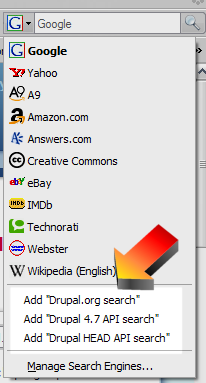
If this is not the most appropriate place to mention this, are there any other / more appropriate groups on groups.drupal.org? (I looked, didn't find a developer or development group).
Comments
4.7 and HEAD search supported
I forgot to mention, there are two plugins, one for 4.7 and one for HEAD API search.
Michael Curry
Exodus Development | Drupal and other developer info
Michael Curry
Drupal and Windows Tips
Added IE7 compatibility and Drupal.org search
I just updated the page to include a drupal.org search plugin, and fixed a few IE7 compatibility problems. So, at least for me, it works on both FireFox 2 and IE7.
Michael Curry
Exodus Development | Drupal and other developer info
Michael Curry
Drupal and Windows Tips
Also...
IE 7 users can simply add the search to their existing search engine options by going here:
Add your own Search Provider
Then just fill out the little "Create your own" form, and use this as the link to Drupal.org: http://drupal.org/search/node/TEST
Give it a name, click "install" and Bob's your uncle!
This sounds quite helpful,
This sounds quite helpful, but for the life of me, I can't see how to download them from your site.
Drupal Dojo - Thelifeofme.com
Very cool!
This is very cool Michael, thanks.
To start using it go to Michael's page and in Firefox just click on the search engine icon in the left of the search box. Select 'Add drupal.org Search'. Wallah you can now search drupal from your search box.
Thanks for the feedback! I
Thanks for the feedback!
I plan on enhancing these - I need to figure out how to deal with multiple word searches on api.drupal.org - right now, it chokes when you search for more than one term. But.. it'll get better, I promise!
Michael Curry
Exodus Development | Drupal and other developer info
Michael Curry
Drupal and Windows Tips
Autodiscovery
Sorry, I've not yet added download links. The page contains 'autodiscovery' links, so you should be able to just use the drop-down menu in FireFox or IE's search bar - it will show you options to install the plugins.

In any case, I've added direct download links for those who are so inclined. I don't know how to install using a downloaded OpenSearch definition file, so you're on your own at the moment.
Michael Curry
Exodus Development | Drupal and other developer info
Michael Curry
Drupal and Windows Tips
fantastic! thanks!
Just installed them on my system - thanks sooooo much Michael! Great idea.
q./
Design Guru
Web Production for communities
http://www.designguru.org - http://www.joomlasphere.net
--
Qasim Virjee
Principal, Design Guru ( http://www.designguru.org )
You are welcome
Sorry it took me so long to post them for all to see.
Please, tell two (or more!) drupal-using friends! :D
Michael Curry
Exodus Development | Drupal and other developer info
Michael Curry
Drupal and Windows Tips
FireFox Shortcut
I'm old-fashioned and like to keep FF's search box on google, and I long for php.net-style auto-lookup for functions. Luckily tou can implement this by following these directions.
Still, very cool Michael. Thanks for the awesome contribution!
http://www.chapterthreellc.com | http://www.outlandishjosh.com
https://pantheon.io | http://www.chapterthree.com | https://www.outlandishjosh.com
Even cooler
Josh, thanks for the info on the shortcut wildcards. I'll try it out soon.
Michael Curry
Exodus Development | Drupal and other developer info
Michael Curry
Drupal and Windows Tips