
Hi All!
I hope you had a wonderful holiday period :)
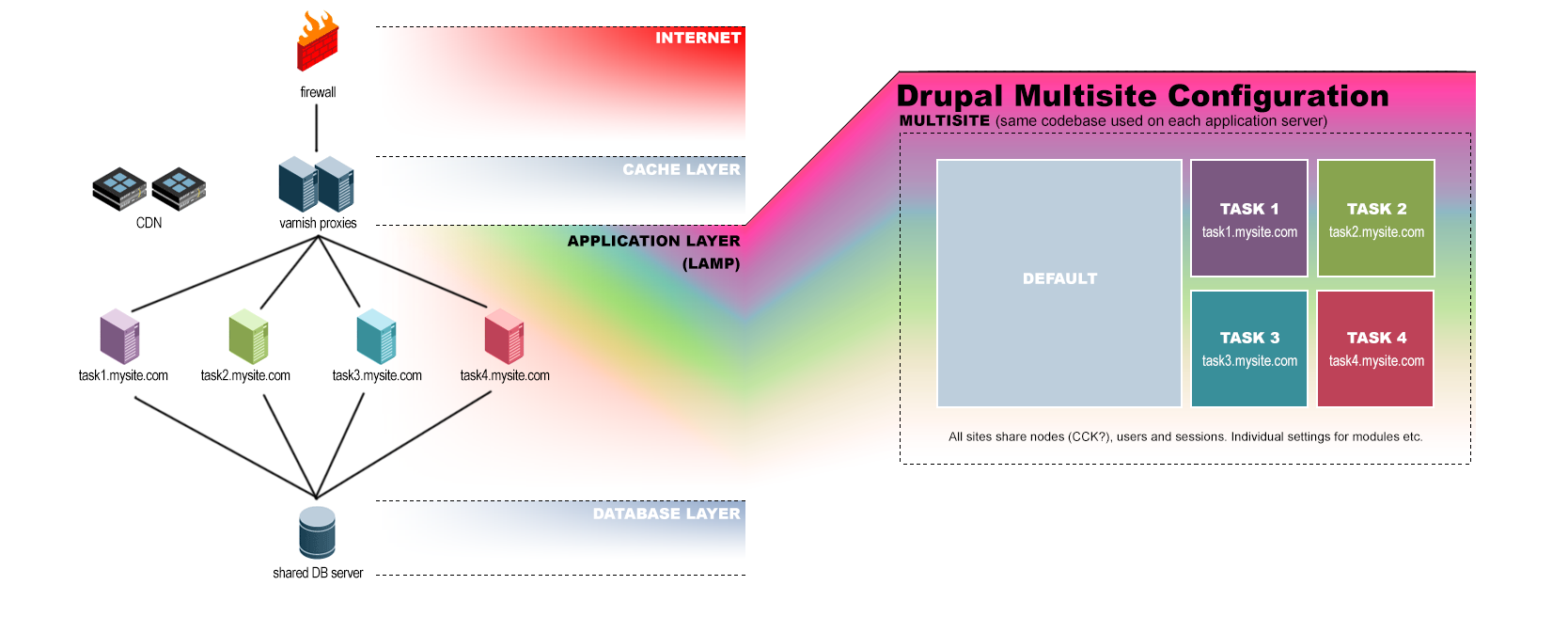
I've been thinking a lot about using multisite to reach the outcomes I desire in terms of performance/redundancy, and have firmed the concept up into the attached diagram.
Having never actually used multisite before I'm still coming to grips with some aspects, but as far as I can see there's no reason why I can't easily share nodes, users and sessions between the sites? Whilst allowing me to have certain modules turned on only for some subsites and not others?
The main objective is to set it up so that if one part of the site (say, "Task 4" which might be dedicated to generating and mailing custom newsletter nodes for each user) crashes, the rest of the site will operate just fine.
Also, further down the track if we have a lot of users, I'd be able to break out more servers based on geographical regions or simply based on load - i.e. "sydney.mysite.com" and "perth.mysite.com" or "load1.mysite.com" and "load2.mysite.com".
Am I missing anything or does this look like a decent start?
Thanks!
BC
| Attachment | Size |
|---|---|
| Infrastructure.png | 246.97 KB |
Comments
I should Clarify...
My intention here is to have multiple databases on the one DB server, with each multisite site having its own database, but there will be a common DB for users, nodes and sessions.
Not sure how to handle CCK? Do I need a shared table for every field?
Also in my specific situation, the sites are likely to be addressed via subfolder not subdomain, so mysite.com/task1, mysite.com/task2 and so on.
In regards of performance ?
I think you will not have any performance increase in using a multi-site setup.
Anyway for "CCK" fields you will have to have a shared table for every field. The persistence of CCK fields is done with a dedicated API (see https://api.drupal.org/api/drupal/modules%21field%21field.attach.inc/gro... ). Might make sense to check this. Or you switch to a ready-made module using the API, e.g. the mongoDB module can shift these fields.
At the end I would assume that the number of "non-shared" tables might be only a couple of tables then.
best
Carsten
From a performance
From a performance perspective I think the only gain from multisite is that if you are using APC for opcode caching you won't need to dedicate as much RAM because all of the sites will be running off the same code base. Other than that I don't think there's much in it.
From a code maintenance POV,
From a code maintenance POV, it can be nicer running multisite... update code once.
This is also potentially a problem, because you can't update one site at a time, it's all or nothing. Test, test, test, before deploying changes.
I highly doubt you'll see performance benefits directly attributable to multisite - it's more a process management issue than anything to do with performance. As mentioned, slightly lower memory from APC or zend opcache (php 5.5).
Now if you're comparing to something like domain access, there's probably more to be said.
Interesting points!
Thanks for your thoughts gents. I hadn't thought about the impact on APC so that's a plus.
My goal in terms of performance is not so much speed increase over a regular site (I expect it to be a little slower) but "performance" in terms of being robust/redundant when we have a lot of users.
For instance I recall using a chat script once on a shared server and it was fine with a couple of users, but turned out to be so processor heavy that it crashed the server with a few more. For similar reasons I'd like to isolate tasks to individual servers so if one task has, say:
Then only traffic destined for that server/task is effected, and the rest of the site remains up and running. App tuning preferred of course, but there's always things that get missed :)
Pingers - I had a brief look at the DA module but it seemed so sprawling I was discouraged at the time. Upon reflection it may be the better choice. Do you think I could use it to achieve the outcomes listed?
I suppose mainly I just need to be able to isolate active modules based on URL so that any troublesome modules only crash/slow one part of the site. i.e. news.mysite.com.au breaks but the rest carries on...
Thanks for your time everyone.
Then only traffic destined
Typically this is handled instead by using a pool of identical web servers with a load balancer in front. The load balancer sends requests off to the web servers and attempts to juggle things to keep the load of each web server equal. If the news section of your site gets a traffic spike then all of the servers combined will absorb it. If tomorrow you instead have a traffic spike in the e-commerce portion of the site it is also balanced across all web servers. If you find that you need more capacity you can either increase the abilities of each web server (more CPUs and RAM), or more typically just add more web servers to the pool. This is a lot more flexible than what you propose: if a single server handles each section of your site and you find that you need to scale up, you can only do so by breaking off another chunk onto another server — not an easy task.
--
Dave Hansen-Lange
Director of Technical Strategy, Advomatic.com
Pronouns: he/him/his
Dave is exactly right.
Dave is exactly right. Ensuring the other sites stay up when one barfs is a function better handled with a load balancer and cluster of backend webnodes. The load balancer can monitor the health of the backend webnodes and route traffic away from any that are bogged down. Need more resources? Toss another identical backend into the mix (trivially-easy if you're using config management like Puppet or Chef and/or are virtualized so you can clone servers quickly), you're done.
Adding multisite into the mix only makes it harder to manage the sites, in my experience. I used to run multisite on many of my systems for some of the reasons mentioned above - lower APC footprint, only having to upgrade core once for many sites - but I've learned in the process that it made more work, not less and the gains were negligible to the point of being unnoticable. It adds complexity - all those separate sites on the same installation meant there is a greater opportunity for module conflicts/incompatibilities. Upgrades are harder because you have to roll out the upgrade to all the sites at once - which was problematic when I was running hundreds of sites and needed to do rolling upgrades. Scripted updates using Drush that can iterate over a list of separate site install turned out to be more robust and easier to work with for me.
I was running hundreds of sites fronted by Varnish that intelligently routed traffic to a cluster of backend webnodes. Varnish monitors the response time of each backend and doesn't send traffic to them if they respond badly (too slow, throwing errors, etc.). It's certainly possible to route certain domains to certain backends in the Varnish config, but I found it was easier to serve all domains from all backends and let the load balancing code handle choosing a backend. This also made updates easier, as I could do rolling upgrades - take a backend out of rotation, upgrade it, test, put it back in and move on to the next - without taking anything down, since the other backends could handle the traffic while I did the update.
-Greg
Greg, Dave...
Thanks for your insights - immensely helpful. Running identical configs with a load balancer certainly seems to makes more sense upon reflection.
I wonder though how one would go about dealing with an extreme situation where say, a seldom called function in a module (let's say our custom "news" module) suddenly breaks and locks up the server - request fails and so the user tries again. The load balancer then sends the next request for the same thing to the next available server and that in turn crashes - and so on until all the backend servers are dead?
Is there a way to mitigate that kind of thing, or does it really just come down to quality code and test-test-testing?
Also have you encountered any problems with cron when having multiple, identical instances? i.e. do all the servers try to process cron triggered functions at the same time?
Thanks again Gents!
In fact
since drush can do SSH you can launch the cron as you want it: in parallel, stagered, whatever you decide, from a single machine. You define some drush aliases and launch all the cron from a single machine.
Even use a queue to manage all the cron runs.
You can also just invoke specific hook_cron implementations so that
you can differ the heavier from the remaining.
As per the the broken server, if your caching proxy is well configured you can make it serve a stale page until the servers are up again. Of course this is only useful for anonymous traffic.
I wonder though how one would
That's a pretty extreme edge case (I've never actually seen it happen on any of the hundreds of sites I've run), but it can be relatively easily handled in multiple ways:
1) Running a daemon like monit on each webnode can monitor and restart a hung or crashed web server.
2) Varnish (what I was using for my traffic routing and load balancing) has a "saint mode" that monitors the responses from the backends and will blacklist certain requests if they, for example, produce a 500 error.
With those two, a request that crashes a backend will see the backend restarted within a minute or two by monit, the frontend will recognize the webnode is sick and take it out of rotation until it reports healthy again, and the specific bad request will be blacklisted on the backend to prevent it from immediately being crashed again. Odds are your users won't even notice the process.
I wonder though how one would
I think twice in the past 10 years I've seen something like this happen, but the problem was not with some bad code, but some deeper problem with Apache. Simply restarting Apache cured the issue.
If you run cron over HTTP then the load balancer treats it like any other HTTP request and sends it to one of the servers. If you run cron via drush then you would only do so on one server (or from a staging server that has the ability to connect to the prod DB).
--
Dave Hansen-Lange
Director of Technical Strategy, Advomatic.com
Pronouns: he/him/his
Excellent.
Thanks gents, I feel pretty well prepared to move forward now.
Uptime is pretty critical to the application I have in mind but I think with a bit of care and planning + integrating the suggestions made here, we'll be fine.
How can I buy everyone a beer? :)
Cheers!