
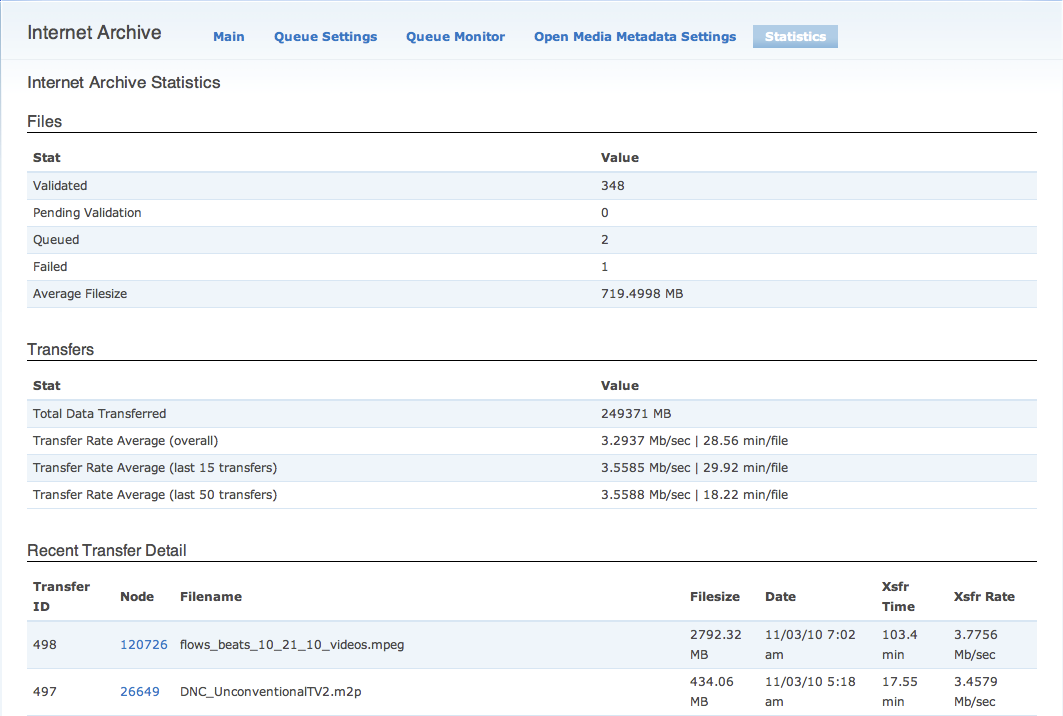
Since installing the Internet Archive module about a month ago, Denver Open Media has transferred 348 shows to archive.org(screenshot). The process has been quite stable with only a few files failing transfer (and the module now supports automatically re-attempting failed transfers). In fact, it's a lot more stable than our current ingest workflow which involves using Media Mover to encode the broadcast file, flash file and create thumbnails. Since Archive.org automatically generates a web ready h264 and thumbnails, our need for Media Mover is minimal at this point. So, over the next few weeks we will be modifying our current ffmpeg encoder to work more like a drop-box which auto-encodes all files that producers put in our ingest folder to mpeg2. Instead of selecting their original files, producers will select the already encoding/ed mpeg2 on the show form. This file is then sent over to archive.org via the Internet Archive module, and we use Archive's derived h264 and thumbnails for our on-demand web library. I believe this process is similar to the workflow at Channel Austin & OKV, with the addition of offloading part of the encoding/storage process to Archive.org instead of Amazon S3 or a local encoder.
Things we had to consider with this new ingest workflow include:
- Shows that cannot be sent to archive.org, for licensing reasons or content (pornographic), will not have a web file generated. This means users will not be able to access the content on our website other than a page showing the metadata, and they are less likely to vote. Without voting data, it is likely the show will only air once on our channel/s. This is not a major issue for DOM, as they require Creative Commons licenses for almost all of their content and they don't mind 'favoring' content that can be shared over content that can't.
- We are placing a lot of faith in Archive.org, assuming that it is going to continue to exist and be stable in the forceable future. If archive.org goes down, the web videos on our site will also be unavailable. We decided this wasn't a serious issue, as we will continue to store the original broadcast mpeg2 files, so if we had to we could re-generate local web versions again in the future if there was an issue with archive.org. In addition, from what we've seen so far archive.org is much more reliable than our own local site for hosting content.
- A third general issue we talked about is managing take-down notices. Right now it's very easy for our station director to just go to the Drupal node and delete the show if there is a problem. In this new workflow, we would also need to manage having content removed from archive.org in the case of copyright violations. Archive's policies on copyright violations are pretty straightforward, http://www.archive.org/about/faqs.php#20 and follow the Oakland Archive Policy here: http://www2.sims.berkeley.edu/research/conferences/aps/removal-policy.html. Since this has been a rare issue for Denver Open Media in the past, our hope is that this will not take to much additional staff time.
- The last issue we continue to address is metadata management and show updates. We frequently have producers who create new shows, upload their files, and then due to issues with the video need to update it with a new version. In the new workflow, the 'incorrect' file will already exist on archive.org as well, so it will be a manual staff process to contact archive.org, have the original file deleted, and then send the new file to replace it. For metadata updates, I'm working to add "update" functionality to the Internet Archive module, so hopefully this will be managed automatically in the future.
The benefits we're already seeing from moving our files to archive.org are numerous:
- Progressive streaming, embedding h264s from archive.org allows our viewers to seek forward on files without having to download the entire show. This is nice when we're dealing with hour long content. You can test it out here: http://denveropenmedia.org/project/love-outreach-pentecostal-church/show...
- Better quality, Archive.org's h264 encoding is much better quality than what we were generating with our local ffmpeg instance.
- No bandwidth hit for streaming content, although this is balanced out a bit by the bandwidth used to get the broadcast files to archive.org. In the case that a video did become very popular on our site however, Archive.org has more than enough bandwidth to handle it whereas we do not.
- Less encoding errors. So far, every file that we've sent to archive.org has encoded properly which was not the case on our internal setup.
- Much easier to share files. All of our broadcast files will be available for download on archive.org at http://www.archive.org/details/denveropenmedia and can be pulled via RSS feeds by project or any of the other search options available here: http://www.archive.org/advancedsearch.php
- Offsite backup of our broadcast files, we're no longer dependent on our local storage if disaster were to strike.
For reference, the metadata that the internet_archive_om_metadata submodule is currently storing at archive.org with the show files is:
Archive Field | Drupal Field
Title => Node Title
Description => Node Body
Date => Node created date
Producer => field_om_creator
Genre => field_om_genre
Subject => field_om_genre (subject is used by Archive.org for keyword tagging)
tv-parental-guidelines => field_om_rating
omp-locally-produced => field_om_locally_produced
Runtime => field_om_show_duration
Zip => Location (if available)
Latitude => Location
Longitude => Location
omp-project => stationprefix-groupnodeid
| Attachment | Size |
|---|---|
| internet_archive_stats.png | 84.04 KB |
Comments
Archive Takedown Procedure
check out the "make dark" option for an item on archive.
in your case, your program manager would log on with the archive@openmediafoundation.org user id and go to the Item Manager page for that item.
http://www.archive.org/item-mgr.php?identifier=
in the case of a takedown notice, they would click the "make dark" button.
That's great, I remember
That's great, I remember seeing that but wasn't entirely sure what "make dark" meant. That will make it even easier to deal with take down notices if we ever get one. Now if we can just figure out how to get faster transfer speeds, averaging 3-4Mb/sec isn't particularly amazing since we are on internet2 here.
Open Media Foundation