
Access Humboldt has developed an automation system to contribute to archive.org. It's simple in theory and should be easy enough to deploy at other centers. Currently the model works with Telvue's Princeton Server and we're looking to expand the use to other servers in this market.
The basic concept is that a category is created in the Princeton Server(PSG) and that alone is used to direct content to be submitted to the Internet Archive. Once content completes upload, is verified, and transcoded a new node is produced within our Drupal site and is immediatly available online. I'm attaching the workflow to illustrate the process. Be warned it isn't pretty.
And for those really interested in the details...buckle up.
Manual Step:
An operator (human) schedules programs on princeton playback server. This follows the basic ingest workflow for the princeton. The only modification to the princeton is creating and selecting a category to signal each program for upload.
Nightly Jobs:
-get_princeton_channel_rss_feeds.sh, this imports schedule data into the database
-incremental_load_of_uploads_table.sh, this finds any new files on the princeton and checks to see if there are any programs for upload to archive.org
NOTE: A program is not selected for upload until there is a schedule entry for it(from which we pull category and duration) AND the file exists on the princeton.
-archive.org identifiers are calculated from the princeton file name
-A directory with identifier as dirname is created in /home/data
-job "batch" control files are created
-xml files are created and put in the directory
-ncftpput jobs created for directory copy of xml files
-second set of ncftpput jobs created to rename mpg files during ftp upload
-ncftp spool started
-Job uploads at 75% bandwidth capacity
Every two hours:
-update_upload_success.sh checks for upload completion, this fires off an archive.org contrib_submit command and logs the results in the database
Every four hours:
check_archive.org.sh checks all the files that are available on archive.org a file is not "available" until transcoding (initiated by the contrib_submit command) is complete. The stream url for the file is found and stored in to database.
Nightly within Drupal
-CRON job runs 'node_creator' module, this checks database for completed items. Once content is verified as being available a node is created containing the embed code from archive.org and all meta-data associated with file including links to a variety of formats for download. Once node is created the final state is recorded into database and process is complete.
So that's it in a nutshell.
The system is being reworked into a virtualized server for portability. The technologies used are Ubuntu as the OS running MySQL as the database. The scripts are written in AWK and PERL. The current Drupal module used is Node Creator. This is being redeveloped to better to suit our needs and to serve us properly for version 6 of Drupal.
Questions? Comments?
Thanks.
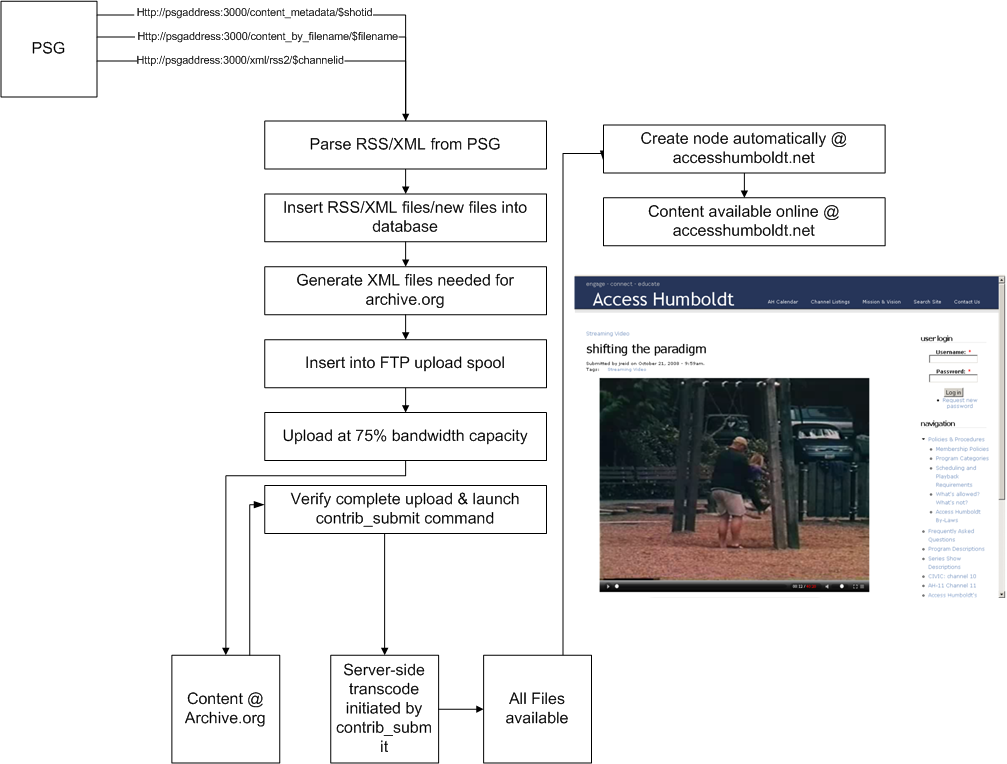
| Attachment | Size |
|---|---|
| archive_workflow.png | 197.25 KB |

Comments
Customizing this for Synergy/Tiltrac
Great stuff Jesse.
Wondering how this would work in our little environment - no Ubuntu, no PERL/AWK expertise with our staff.
My guess would be that I could parse your .sh files into Windows script host, or just skip all that and grab XML out of the VLM.mdb?
How do you deal with metadata?
The goal is to virtualize
The goal is to virtualize the whole server into a virtual box or VMware guest allowing a more or less painless setup. The scripts alone are only about 32Mb's total. Since the system is only running a few processes we are looking into using a very stripped down linux(ubuntu in this case) server. Once the system is virutalized it could be run on any desktop or server system using a minimal footprint and left alone to do its thing. As for metadata, we're pulling and parsing 3 xml files that are readily available from the Princeton. I'm not familiar with the Synergy system. You mentioned a .mdb file, is your metadata stored in a MS access DB or are you using a 3rd party software for ingest/scheduling? What kind of workflow are you utilizing currently? However, there's no explicit reason to be using XML. It's just what's available from the Princeton without any special requests.
Hope that helps
I added the image Jesse
I added the image Jesse shared at ACM West to his post. I think that is still accurate based on what Jesse has described.
Jesse, you mentioned being able to subscribe to the content being uploaded by Access Humboldt, but I can't figure out how to do that.
Am I missing something or did I misunderstand?
All of the video looks like it was uploaded to the Open Source Movies collection without any metadata that would allow me to see just the video from Humboldt. Searching for "Access Humboldt" looks like it is only showing the video because Access Humboldt appears in the title.
I'm hoping we can find a way to convert this to a Drupal module. DOM's original autoscheduler was written in Python because that's what the person who had volunteered knew best. I'm hoping Humboldt's scripts are similar and there isn't anything specific to PERL/AWK required for the functionality. If this isn't tied the language for functionality, we can use Humboldt's code as a blueprint and convert it into a Drupal module making the functionality easier to distribute and maintain. That said, this won't be something we'll even start looking at in Denver until we get the first 6 Open Media Project groups up and running. That is going to keep us busy through July.
It's also worth pointing out
It's also worth pointing out that Media Mover already includes a "sub-module" to move files to Amazon's S3. The "normal" workflow would be to use FFMPEG to process the video and then move it, but it seems like a logical place to add a feature that moves files to archive.org for processing.