
Posted by heather on July 20, 2008 at 3:15pm
is it possible to change the location of the search and secondary menu to "appear" on top of header... without changing the HTML?
i can't seem to manage it... this is what i'm trying to do:
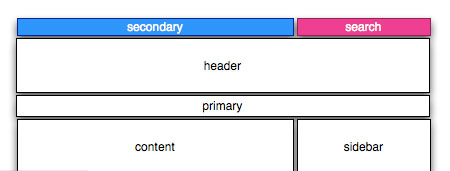
| Attachment | Size |
|---|---|
| secondary-nav.jpg | 9 KB |

Comments
No
I don't think this is possible without HTML.
You'd need to absolutely
You'd need to absolutely position it. But in order to do that you'd need to be sure that its nearest positioned ancestor ('relative' or 'absolute') is #page. Since #navbar is a child element of #main (which needs position:relative) in order to put the sidebars in the right place (I believe), this is going to be tricky.
Another option is if you know the height of the #header, you could add a margin to the top of the #header which is the same height as the #secondary div and then absolutely position the #secondary using a negative top value. Something like this (totally untested and made up):
 #header {
  height: 6em;
  margin-top: 2.5em;
}

 #secondary {
  height: 2.5em;
  overflow: hidden;
  position: absolute;  /* this will position it relative to the #main element /
  left: 0; / align the left edge with the left edge of #main /
  top: -8.5em; / place the top edge 8.5 em (#header height + top/bottom margin) above #main */
}
Spend a bunch of time messing with this in Firebug to see what you can get. Firebug has a really cool feature where you can click on a numeric css attribute (like "6em") and you can hit the arrow up/down keys to increment/decrement it. I use this a lot for pixel perfect positioning.
You could use the same technique to float the #search div up there too.
-= Jeff Robbins | Lullabot | Drupalize.me =-
Absolutely position it
The #main-wrapper might have relative positioning, but it really doesn't need it to create columns. Absolute positioning is the way to go to put the menu at the top of the page. Avoid negative margins and negative positioning where possible.
Another thought is place those blocks (secondary-nav & search) in the header and adjust them accordingly.
A general rule of thumb: avoid positioning any elements unless you absolutely need to.
negative!
ah ha!
i didn't think of a negative top margin... i did try both absolute (which couldn't get above the header) and position:fixed (where it doesn't scroll)... but i didn't think of a negative top margin...
i edited the html :)
but i'll give this a whirl!
Noooooo! Editing the HTML is
Noooooo! Editing the HTML is like pulling the stickers off the Rubik's Cube! :-)
(joking, of course... but there is always that puzzle-solving aspect to Zen theming)
-= Jeff Robbins | Lullabot | Drupalize.me =-
rubik
editing the html is like pulling the stickers off a rubik cube!
kudos on the quote.