
Posted by robives on January 8, 2010 at 8:33pm
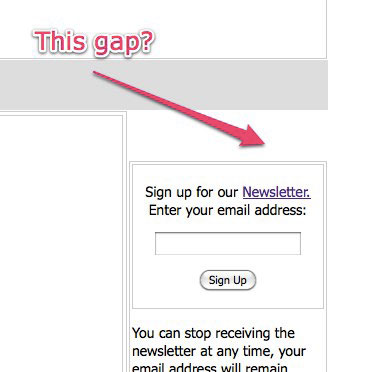
I've been going round and round trying to track down where this margin is coming from.
I have the navigation region turned off and my own page-top region added (the grey area.)
There is a gap of approx 50px between the top of the right column and the page-top
region. Any idea where it appears in the css?
Thanks!
| Attachment | Size |
|---|---|
| zengap.jpg | 19.63 KB |
Comments
It will be much, much easier
It will be much, much easier to help you with this if you can link us to a site with the theme running on it than just giving us a screenshot, which tells us pretty much nothing except that the problem exists.
Also, are you using Firebug yet? I certainly hope so.
The Boise Drupal Guy!
Good point!
Check out www.robives.com and log as averagejoe with password password
thanks
Rob
This does not appear to be a
This does not appear to be a Zen-based theme - nor does it match that screenshot. Did you change it recently?
The Boise Drupal Guy!
You need to log is as
You need to log is as averagejoe and use the password password, then you'll see the theme in question.
Is this what you mean?
On line 596 of style.css, body.layout-first-main #sidebar-first is given a 24px top margin.
On line 839 of style.css, div.block-wrapper has an additional 10px top margin.
However this looks intentional, because it aligns with the 34px top margin on body.layout-first-main #content-wrapper (from line 601), so I'm not sure that's what you were referring to.
As Garrett Albright says, Firebug is your friend! Just point and click on the offending element and all the styles are revealed for your debugging pleasure!
Thanks!
I guess that is what I mean but I'm confused. Where is the style.css file located? Is this a central css file that all styles inheret from? There is no style.css file in the theme folder.
Also, I'm using firebug but I see no reference to the content of style.css. Perhaps I'm using it wrong. I'm clicking on the icon next to the bug with a rectangle and arrow. Then I'm clicking when the outer rectangle of the right hand box is 'lit up'
The HTML shows
<
div id="sidebar-right-inner" class="region region-right"> selected. In the style window I see no reference to style.css.
Any advice would be greatly appreciated.
TIA
OK I see now
I was having the same problem as Garrett Albright - I wasn't logged in as you had instructed. So he and I were both looking at a different theme.
Having now followed your instructions, I have figured out half your problem but I'm missing something (not enough coffee yet?)
It appears that you've renamed the #navbar div to #page-top. So my suspicion is that you are missing a couple of #navbar properties that should be applied to #page-top for the Zen layout to work and that's what's causing your problem. One of those is "float: left" — if you add "float: left;" to #page-top it remove that div from the flow so it's not causing #sidebar-right to get pushed down an additional 50px. However, when you do this, the sidebar now floats to the right of the navigation, so something else is missing in the styling.
I would check your stylesheets for any instances of #navbar and change those to #page-top (changing any div heights or margins accordingly), and see if you can figure out what else is missing. It's driving me crazy that the solution to this isn't obvious to me, but if you can't find it hopefully someone with more Zen experience can shed some light on it.
Thanks for your help,
As I'm so early in the development of the theme I think it might be easier to just start again - this time sticking with the original #navbar Thanks for your help, it is much appreciated. (I expect I'll be back!)