
Posted by vulfox on June 17, 2010 at 7:45am
Using Zen 2...
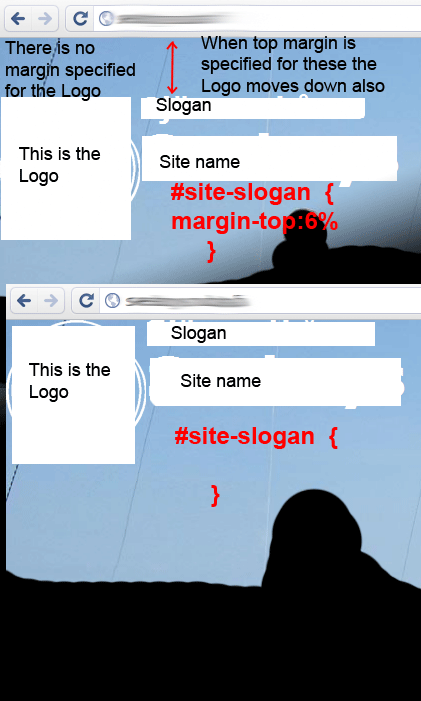
I try to position Site Name and Slogan so that they would be a bit lower than Logo. I have tried doing this by giving either #name-and-slogan a margin-top:6%; (I tried px too) or by giving #site-slogan a margin-top:6%;. (I have repositioned Slogan so that it is before Site Name in page.tpl.php.
My problem:
the Logo moves down too even though it is before Site and Slogan in the code and is outside of the DIV(s) I try to move.
Below are the header -part of my page.tpl.php and part of my pages.css and attached a picture of the situation.
MY SITE HEADER
 <div id="header">

   <?php $header_background_img = $base_path . path_to_theme() . '/header-background.jpg'; ?>
       <img class="background-img" src="<?php print $header_background_img ?>" />

   <div class="section clearfix">
      <?php if ($logo): ?>
        <a href="<?php print $front_page; ?>" title="<?php print t('Home'); ?>" rel="home" id="logo"><img src="<?php print $logo; ?>" alt="<?php print t('Home'); ?>" /></a>
      <?php endif; ?>

      <?php if ($site_name || $site_slogan): ?>
        <div id="name-and-slogan">
          <?php if ($site_slogan): ?>
            <div id="site-slogan">
          <a href="<?php print $front_page; ?>" title="<?php print t('Home'); ?>" rel="home"><?php print $site_slogan; ?></a>
          </div>
          <?php endif; ?>

        <?php if ($site_name): ?>
            <?php if ($title): ?>
              <div id="site-name"><strong>
                <a href="<?php print $front_page; ?>" title="<?php print t('Home'); ?>" rel="home"><span><?php print $site_name; ?></span></a>
              </strong></div>
            <?php else: /* Use h1 when the content title is empty */ ?>
              <h1 id="site-name">
                <a href="<?php print $front_page; ?>" title="<?php print t('Home'); ?>" rel="home"><span><?php print $site_name; ?></span></a>
              </h1>
            <?php endif; ?>
          <?php endif; ?>

        </div> <!-- /#name-and-slogan -->
      <?php endif; ?>

      <?php if ($search_box): ?>
        <div id="search-box"><?php print $search_box; ?></div>
      <?php endif; ?>

      <?php print $header; ?>

    </div></div> <!-- /.section, /#header -->
part of my pages.css
#logo /* Wrapping link for logo / {
  float: left; / LTR /
  padding: 0;
  width: 140px;
  height: auto;
/  margin-top: 15px;
  margin-left: 15px;
  margin-right: 15px; /
}

#logo img {
  vertical-align: bottom;
  width: 100%;
  height: auto;
}

#name-and-slogan / Wrapper for website name and slogan / {

}

#site-name { / The name of the website /
   font-size: 4em;
    line-height: 1.3em;
}

#site-slogan / The slogan (or tagline) of a website / {
   /margin-top:6%;*/
 font-size: 2em;
    color:#FFF;
    font-weight:bold;
}| Attachment | Size |
|---|---|
| top-margin-prob.gif | 63.47 KB |
Comments
and yes
and yes ...
/margin-top:6%;/
...is commented out in the code abowe. That's when everything is as high it can go in the window (no top margins). If a enable the margin the Logo moves also even though it has no margin.
#logo img { vertical-align:
#logo img {vertical-align: bottom;
}
Hmm.
The Boise Drupal Guy!
Could be, but no...
Yeah... I have tried removing
vertical-align: bottom;. No effect.The logo moves either when
#name-and-sloganhastop-margin:OR
when the first element in
<div id="name-and-slogan">has top-margin. In my case I have put the<div id="site-slogan">first