
Sometimes I've been looking for a module which would let me crop an image visually, though I haven't found one working for the drupal version I've been using, until recently when Imagefield crop became available (Edit: which supposedly will be folded into Imagecrop for D6. The latter module is a later addition which I weren't aware of when I wrote this.)
However, there is still one missing concept and that is Relevance-Enhanced Image Reduction which is what would be the best solution for this.
I've been discussing this with the developer of the module in an issue for his module, and he says that the current version supports the above.
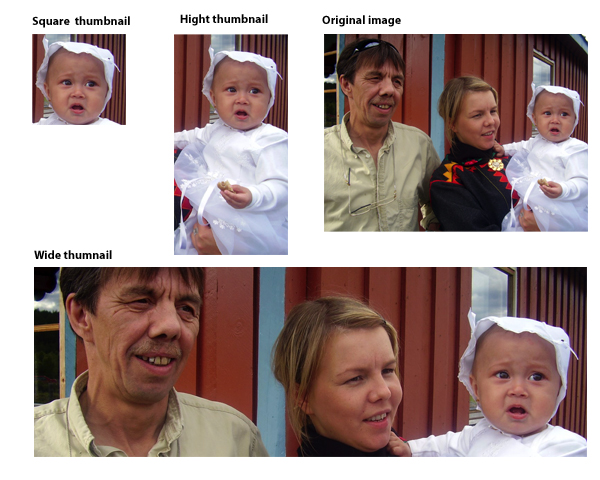
What I would like in addition is to manually set the crop and zoom for all the presets used in the Image module. Thus I can create a relevanced-enhanced image for the given preset.
The attached image will show you how that might look on a page. Each of the images on that page, except the one labeled "Original image", will let you pan and scan in the original image (just use mouse drag, like in a google maps map), and zoom in our out, for example using scroll wheel on the mouse, or ctrl + moving the mouse up and down.<img src="http://groups.drupal.org/files/relevanced-enhanced-image-scaling-to-preset-sizes.jpg" width="600px" height="480px" style="float: right;>
For example in the wide selection the crop I've chosen is the widest/largest of the original image, I would not be able to zoom further out, but I could move it up and down in the image in order to get the exact framing I want.
In the square image I can't zoom further in, because the image has a 1:1 relation with the pixels in the original image, any further zoom in is therefore not possible. I could zoom out, or move the viewport around the large image.
I haven't seen any system using REIR except Polopoly, but then again, I haven't tried more than 10-15 systems.
My pros for this:
- user can see exactly how the thumnails will be represented
- the user can not select unstandard image sizes
- the user don't have to know the image sizes
- the user can do everything in one page, thus setting up a clearly defined goal, which is achieved when clicking submit
- your website will be much snazzier when the pictures are relevant
My cons for this:
- if you have many presets the page can get long/cluttered
You can help me out with the con part ;)
In Polopoly the system would create thumnails of each image preset again, but I think that the user should be allowed to set the exact framing for every size. So if you want a smaller version of the "Wide thumbnail", then make a different preset and let the user select the exact framing.
| Attachment | Size |
|---|---|
| relevanced-enhanced-image-scaling-to-preset-sizes.jpg | 229.63 KB |
Comments
Moo
It sounds like how it's done at Moo.com: You can resize the uploaded image with a slider, then click-drag the image within it's frame.
If you haven't seen how it works, go to their website, choose a product and click on "Upload or import your images".
It helps keeping the UI small, as the part of the image outside of the frame is hidden.
Yes
That's a very good example. Also note hove they have this info on the side saying "Low resolution
This image may be blurry when printed", that's actually a feature of the Polopoly system, it will warn you if any of the derived images will get blurry.
The Moo.com solution seems like a very nice solution, it visualizes everything.
I'm currently working on
I'm currently working on module for a client which uses imagecache 2 and the power of hook_imagecache_actions(). See more info on http://drupal.org/node/234898.
Very nice module
At least from the screencast ;) I haven't tested it yet, since I'm developing on D6 at the moment.
EPSAcrop is the solution to this
The excellent module http://drupal.org/project/epsacrop does what I need. The interface is elegant and easy to understand.
ImageField Focus is another solution
You may also try ImageField Focus.
This module allows to scale and crop images focusing on their important portions.