We as website developers juggle several languages, a host of markup models and files that all need to be put to together to create the Drupal experience for our users.
Many of us have spent countless hours finding, and setting up our own development environments. In the spirit of sharing and collaboration, this group focuses on finding and providing tips, config files and best practice advice about IDEs for Drupal web development.

Drupal API extension for Dreamweaver
XTND.US releases early preview download of their Drupal API extension for Dreamweaver. Reduce typing and get past plain text editing of Drupal files in Dreamweaver. If you are into Drupal and use, or want to use, Dreamweaver then you really need this extension. Let us save you tons of time by reducing keystrokes with our Drupal API code hints integration for Dreamweaver (API versions 5 & 6). The extension provides code hints and code coloring for every Drupal API method in Drupal 5 & 6.
Not only does it provide full Drupal API code hints (5.x & 6.x) in PHP files, but it also adds support for common Drupal file types, like .module, .theme, .info, .tal, etc., provides code coloring and code hints while editing those file types, treating them similar to common PHP pages. No more tweaking Dreamweaver's configuration manually, just download this free extension and makes Dreamweaver more useful when working on Drupal modules and themes.
View a demo video or download the extension at http://xtnd.us/dreamweaver/drupalapi.


PHP Drupal bundle for Textmate added to Macromates SVN
We finally did it. I submitted a PHP Drupal for Textmate and it is now listed at http://macromates.com/svn/Bundles/trunk/Review/Bundles/. The bundle primarily consists of work by kkaefer. I've also added bits that have been posted by others over time.
To install, see the Bundles page of the macromates wiki.
Lets improve the bundle. This group is the right place for general discussion about it (Textmate specific RSS feed). I created a Textmate project at drupal.org for discussing patches, bug reports, feature requests.
As for next steps with Macromates - here is the reply from Michael Sheets ....
Read moreI've added the PHP Drupal bundle to the review directory. The next step is get feedback from the community on the bundle before it's inclusion in the main Bundles directory in the repository. Generally these will be posted to the tm-dev list, some of the core bundle contributors may give their comments in the form of a comments.markdown document in the root of the bundle as to easily track the comments.
After a suitable amount of time and any issues have been addressed the bundle can be promoted to the main Bundles directory.
Sorry you thought the need the justify the bundle, we've got room for any languages no matter how small or big. As long as someone writes it we'll add it to the repository. I'll be adding some review comments when I can, until then keep up the good work.
Need from you the subversion username you'd like so I can setup a account for you to update the bundle.
Thanks for your contribution!
--
Michael Sheets
TextMate Bundles Moderator
Pre-release video sneak: Dreamweaver Themer's Kit extension for Drupal
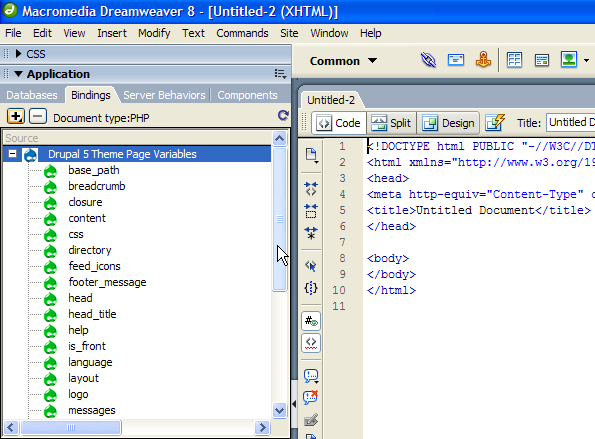
This had been leaked to LA Drupal in Jan. 2008, and now everyone can see a pre-release sneak video of an upcoming Dreamweaver extension, called Drupal Themer Kit Pro, previewed at http://xtnd.us/videos/drupal5.htm - the video features Drupal 5 Template Variables (Feature #2 of 5)
FAQ
When will it come out? 2008

Eclipse Plugin
Create eclipse plugin that will
* Create and edit new modules by editing underlying module info file
* Wizard to create hook methods complete with parameters. Hides method naming scheme, instead asks user how wide of a scope they are intending for their method

Drupal Eclipse
Eclipse is a very powerful IDE. Having it work with Drupal requires installing Eclipse PDT, and then configuring it. Although it's easy to download and use the All-In-One Eclipse PDT, I wanted to start from Eclipse Classic and install what Drupal uses on top of it.
PHP and JavaScript
- Download and install Eclipse Classic
- Help --> Install New Software... Click on "Available Software Sites" and add the following...

JIT debugging with Xdebug
I just posted a quick blog on some hacky ways to enable JIT debugging with Xdebug:
http://www.openkomodo.com/blog/jeffg/jit-php-debugging-komodo
My example is Komodo IDE, but this should be usable for any Xdebug client app. It should be simple enough to enable JIT debugging in a Drupal instance by adding this line to your custom module:
ini_set('xdebug.remote_mode', 'jit');
You should keep in mind that if xdebug.remote_mode is set to JIT, you can't debug in the normal way.
Read more
TextMate command to look up functions at api.drupal.org

Drupal as framework
Drupal is a really good CMS for building almost any kind of site.
What I'm trying to do is to use Drupal as framework like zend or asp.net for developing web applications. Where I just need to include some files to get all drupal functionality, like include of php or C/C++. And to display a block I just call display_block('blockname',...),, like this.
Did anyone has tried this? Is it possible?
IDE tools for other CMSes
Hi, there's a lot of tools for Joomla.
Joomla support for Eclipse, as a set of specific extension to PHPEclipse that are aware of Joomla framework specifics, and libraries. http://wiki.eclipse.org/Summer_of_Code
http://joomlacode.org/gf/project/jcode/frs/ -- http://joomlacode.org/gf/project/jcode/
PHP Development Studio Pro with Joomla included -- http://extensions.joomla.org/component/option,com_mtree/task,viewlink/li...
Textmate Bundles for Drupal
TextMate Drupal Bundle the php script builds the function list against your drupal source (details on the page).
Drupal.tmBundle makes it easy to create FormAPI arrays..."contains tab triggers for almost all forms api stuff."
Read moreStarting Points
Here is a collection of links that can get the group started. This is a wiki page so please feel free to add links you find to this post until we get proper pages for specific setup steps.
Starting points
- How to Succesfully Incorporate Eclipse IDE into a Drupal Workflow
- Configuring Eclipse
- Drupal Podcast No. 31: Drupal Development Tools
- « first
- ‹ previous
- 1
- 2
- 3
