
As some of you know, I was having some issues with not being able to input text in my webform in Firefox. After some digging, I discovered that for some reason the border-box, box sizing in my contrib theme's base css file was conflicting with the arrange fields module. I am using Drupal 7 with Corolla as my theme.
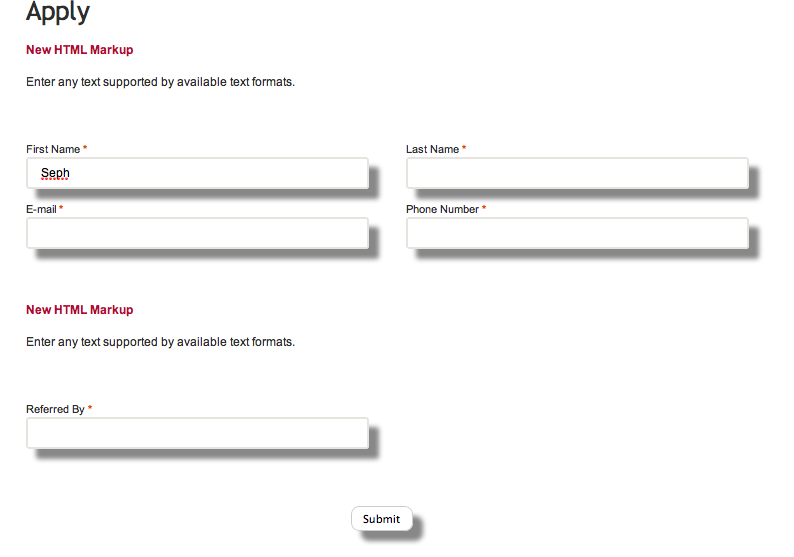
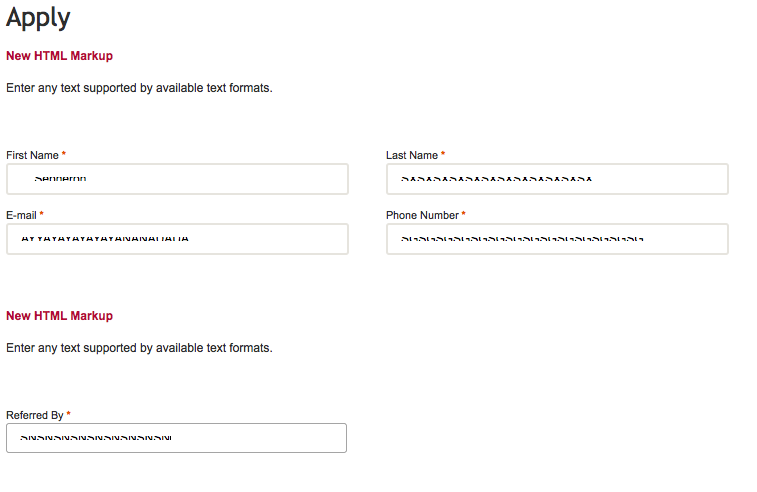
After deleting the box-sizing, I now have gotten it to somewhat work, but I am still having an issue as you can see from the screenshots below. I am now able to enter text, but it gets cut off at the top and bottom in Firefox. It's working in Safari and other browsers. Any guidance you can offer would be greatly appreciated as I'm feel a bit stuck at the moment.
Once I get this taken care of, I can go live with my site pretty quickly.
I have also included my css files.
Thanks!
Seph
| Attachment | Size |
|---|---|
| Safari.png | 34.46 KB |
| Firefox.png | 32.86 KB |
| base.css_.txt | 7.03 KB |
| custom.css_.txt | 1.09 KB |
| arrange_fields.css_.txt | 2.49 KB |
Comments
This is just a guess, but
This is just a guess, but maybe you can try the following:
input::-moz-focus-inner /Remove input padding in FF/{
padding: 0;
}
or more specifically:
input.form-tex::-moz-focus-inner /Remove input padding in FF/{
padding: 0;
}
I added it to my custom css
I added it to my custom css file, cleared the cache. No change.