
Posted by pkcho on January 12, 2010 at 8:10am
I'm trying to adjust the CSS for a specific block. Currently, the block is governed by system block parameters, but I don't want to change these settings sitewide. Can someone show me how I can target this specific block?
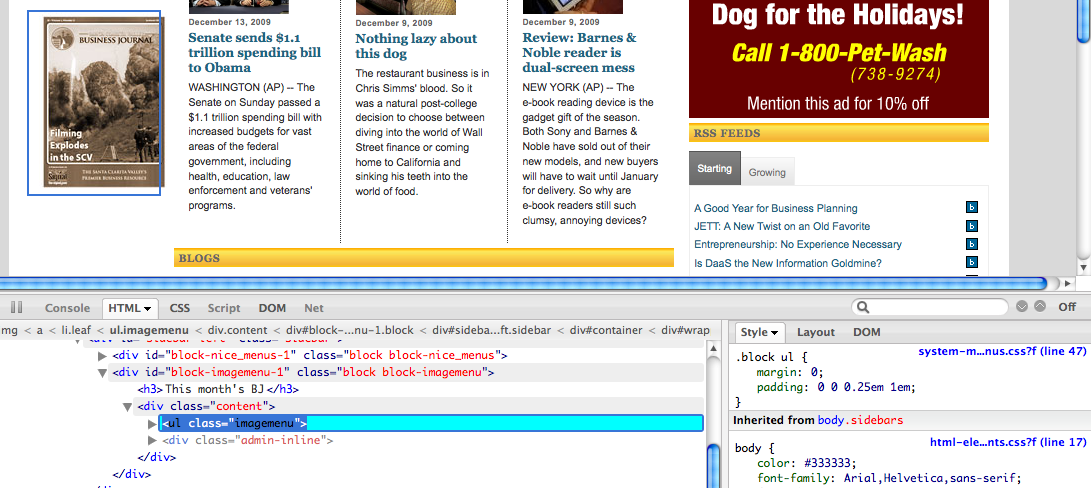
I've included a screenshot of the page with the block highlighted using firebug. The ".block ul" style allows me to adjust the padding, but I don't want to do this sitewide.
Thank you.
| Attachment | Size |
|---|---|
| screenshot.png | 225.37 KB |
Comments
This is how I usually do it
I start by using the ID of the block I want to modify the css for. In your example, I would do something like:
block-nice_menus-1 {
width: 300px;
float:left;
border:1px solid #696969;
}
block-nice_menus-1 a:link {
color: #cc9900;
text-decoration:none;
}
This way you are simply altering the elements of you target block. Keep in mind, the order in which the CSS code is listed in your CSS file makes a big difference. For example, if you made the above modifications to your block but your css file has other properties assigned to all blocks, the properties listed last on the css file will be the ones that will take effect. I usually move my custom changes to the bottom of the css file to ensure my changes overwrite any default properties in the css file. Or I make sure my changes are listed below other properties for the target element I am working with in my css file.
I hope this helps.
Mario
CSS specificity
Using CSS specificity will allow you to target anything and not affect the rest of the site, if that's what you need.
Chris Charlton, Author & Drupal Community Leader, Enterprise Level Consultant
I teach you how to build Drupal Themes http://tinyurl.com/theme-drupal and provide add-on software at http://xtnd.us
sorry, I guess i was unclear
Yes, that is what I need to target the specific CSS.
Mario, actually, I'm trying to target the block in the "block-imagemenu-1" div.
targeting
Since you have a unique identifier to target it is easy enough (with Firebug's wonderful assistance) to specify:
div#block-imagemenu-1 { width: 300px; float:left; border:1px solid #696969; }
or just
block-imagemenu-1 { width: 300px; float:left; border:1px solid #696969; }
if for instance the id is not applied to a div element. I can't tell from your screenshot if block-imagemenu-1 has been defined somewhere else in a stylesheet but if not then you should be able to manipulate it with a declaration like my example.
Thank you for your help! Clarification?
Thank you for all your input I was able to target the css.
If you all don't mind, for clarification... sometimes, Firebug shows a generic class ".block" that controls the look for the item I want to tweak. That ".block" resides in a specific div "#homepage-left".
When I'm targeting that specific ".block", how do I write the css? What is the convention that is used to address it?
For example: #homepage-left .block
Another example: #block-imagemenu-1 .imagemenu
Where the # div comes first and then the class with the space and the period? Is this correct? How about with a span?
Does this allow me to change the css only for that .block in the div #homepage-left without affecting any other .block in the rest of my site?
Thank you for your help!