
A few of us are having coffee and talking Drupal on Wednesday, February 10, 2010, at the Davidson Library at UC Santa Barbara. You're invited! As always, just bring your laptop, a copy of Pro Drupal Development or whatever else you need.
This event is free and no RSVP is required, but if you plan to attend please sign up by logging in and clicking the "Sign up" button below. Knowing how many people are interested in attending can help us better select good locations in the future. People who sign up will also have last minute details (if there are any) sent to them before the meeting.
| When: Wednesday, February 10, 2010 from 6:30-8:30pm |
| Where: The Davidson Library at UC Santa Barbara |
Location
 We're being hosted this month by UC Santa Barbara Library, and we'll be meeting at The Davidson Library right in the center of campus off of UCEN Road.
Directions to the UCSB campus
Traveling north on 101, take the Airport/UCSB exit (Highway 217) off of 101 approximately eight miles north of Santa Barbara to the campus East Gate.
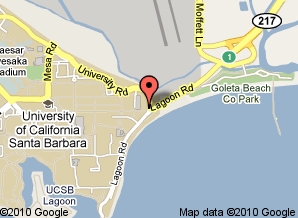 Traveling south on 101, take the Storke Road/Glen Annie Road exit off of 101 approximately twelve miles north of Santa Barbara. Turn right on Storke Road and proceed two miles to El Colegio Road. Turn left on El Colegio Road and proceed to the campus West Gate entrance.
Parking
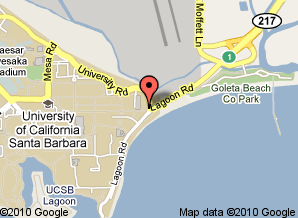
Options for parking include paid parking on campus, the Goleta Beach parking lot and on-street parking in Isla Vista. If parking on campus, please be sure to get a permit from an automated dispenser (it's just $3 after 5pm). See the map for more detailed information.
Topics
Previous meetups have often been held in coffeeshops and were a combination of open discussions and lightning talk-style presentations. We'll have the use of a conference room with a projector this time and have a great opportunity to have longer presentations. If you'd like to present on a topic or just ask questions of the group, please feel free to leave a comment below.
| Attachment | Size |
|---|---|
| googlemap-ucsblibrary.gif | 17.89 KB |
Comments
One topic I'm happy to present
One topic I'm happy to present is on image handling in Drupal 6 and how inline images have vastly improved since Fall, 2009. Building a site with IMCE, Image Assist or even Asset is not always a good idea when the site is being handed off to a client. We'll show how to combine half a dozen modules (don't worry, you probably use half of them already) to implement a gorgeous, intuitive image handling solution for newbies, site editors and experienced admins alike.
I forgot to mention, we'll be giving
I forgot to mention, we'll be giving away a Using Drupal ebook from O'Reilly (a $36 value) to one of the attendees. No purchase necessary, void where prohibited, you must be present to win, etc.
Image handling sounds great.
IN the past, I've spent a lot of time trying many combinations of image-related modules but wasn't able to find a very robust solution.
Here are a couple of issues I'm facing right now:
Are gallery type modules (like Gallery2) worth the trouble to display hundreds or thousands of images in a site dedicated to nothing but display of photography? Or just rely on views and other modules to create galleries and sub galleries and slideshows. I know the latter gives me greater flexibility.
Multiple sites sharing images: Is multi-site the solution? How much performance I lose and how difficult would it to set it up for the sites to share the same image files and reference to each other's nodes and taxonomies. Example scenario: a node in a blog site displays all images under a given taxonomy from the image site. And vice versa: each image under certain taxonomy has a "related blogs" links pointing to nodes in blog site.
Are gallery type modules
Gallery2 is a completely separate application and I don't recommend it unless 1) you already know how to use it and 2) you're already using it and want to integrate it with a Drupal site. Take a look at Views Gallery (and the related 15-minute video at Lullabot) for another approach that's pretty elegant.
Then again, we know a few people who would argue that it isn't worth the trouble to use Drupal for a site that does nothing but show photos. :) It all depends.
At first glance, it looks like Externodes might work for you. If you try it, please let us know at the meetup how it goes.
There are a lot of different ways to go multisite with Drupal, from using the multisite functionality that's in Drupal core (e.g. one codebase, multiple databases) to using something like the Domain Access module. If using core multisite, you can use something like FileField Sources to display one site's image file on another site. If using Domain Access, you can select the sites you want an image node to be visible on when creating or editing the post.
FileField Sources
"FileField Sources to display one site's image file on another site" is an intriguing thought. I would like to hear more.
Here's a writeup on FileField Sources
Here's a writeup on FileField Sources with a screenshot of the "remote URL" field: http://mostrey.be/file-management-drupal-6-filefield-sources
Directions to the Meetup
So, you have made it to campus, and you want to know where to go?
If you get lost, find someone sitting at an information desk and ask how to find the Map & Imagery Lab. Once you enter the Government Publications area it should become clear.
show notes
At the meetup we talked about a number of things, from Drupal performance and scalability issues and Mollom/Webform incompatibilities (which might be fixed in the upcoming 1.1 release) to the different flavors of multisite and theming Nice Menus (to the person who asked about this, take a look at the Superfish module for an alternative to Nice Menus).
I also gave a short presentation on inline images and, as promised, here are the show notes:
The modules used:
The editors used:
If you plan to use TinyMCE, neither WYSIWIG API 2.0 nor 2.x-dev support it right now. You can use TwoD's patch or choose a different editor until WYSIWYG API is updated.
Recommended extras:
Pathologic prevents broken links when using the Insert module (which uses absolute paths) in case a Drupal site is moved from one domain to another. This can happen when moving a site from dev to staging or live to dev.
Better Formats improves Drupal's input formats by, for example, setting default formats for specific roles and content types.
Thank You
And thank you Christefano, for doing most of the talking that night.
And thanks to everyone who came and made it an event worth repeating!
Hopefully for next time we'll have a few more prepared speakers.
Thank you
Thank you very much Christefano! I was the one with Nice Menus, and I am going to look at Superfish, and hopefully conquer the theming issue with it.
I enjoyed your presentation on inline Images and wish my memory was better because somehow I cannot get "Insert" to work ... - I don't get that choice in the window at all.
When the resize did not work with Safari but Camino during your presentation - I was thrilled! The same thing happened to me a wile ago and I undid my install of what I had installed to resize images, because I could not figure out where I went wrong - IMNSHO an aha moment :) Wish I could get one for "Insert"!
Thanks again,
Pia
Curious, curiouser and most curious ...