Announcing Wild Pockets Gallery Beta
Over the past several weeks, the team at Wild Pockets has been hard at work on a prototype gallery publishing system. This new system will make it easier for developers to share their Wild Pockets content with the community and increase connectivity between the Wild Pockets Engine and Website.
We're very excited about the potential of this new gallery system and are exposing it to our users initially as a new model publishing pipeline. The new pipeline is a rapid publishing system which exports the model from your 3D modeling program directly to an embedded model viewer on the wild pockets website where you can add it to the gallery proper. We'd love if you could try out the new publishing pipeline by downloading one of the new beta exporters and trying to export a model to the gallery.
Some of the highlights of this new system include:
We're very much in a prototype stage at this point, but looking for feedback on how to improve the process. Please check out the below resources for more information on how to use the new publishing system, as well as examples of what sort of detailed feedback we are looking for.
If you know other 3D artists or developers who may be interested in this sort of publishing 3D art to web technology please feel free to pass this on to them.
Thanks!
Resources:
Download the new beta exporter
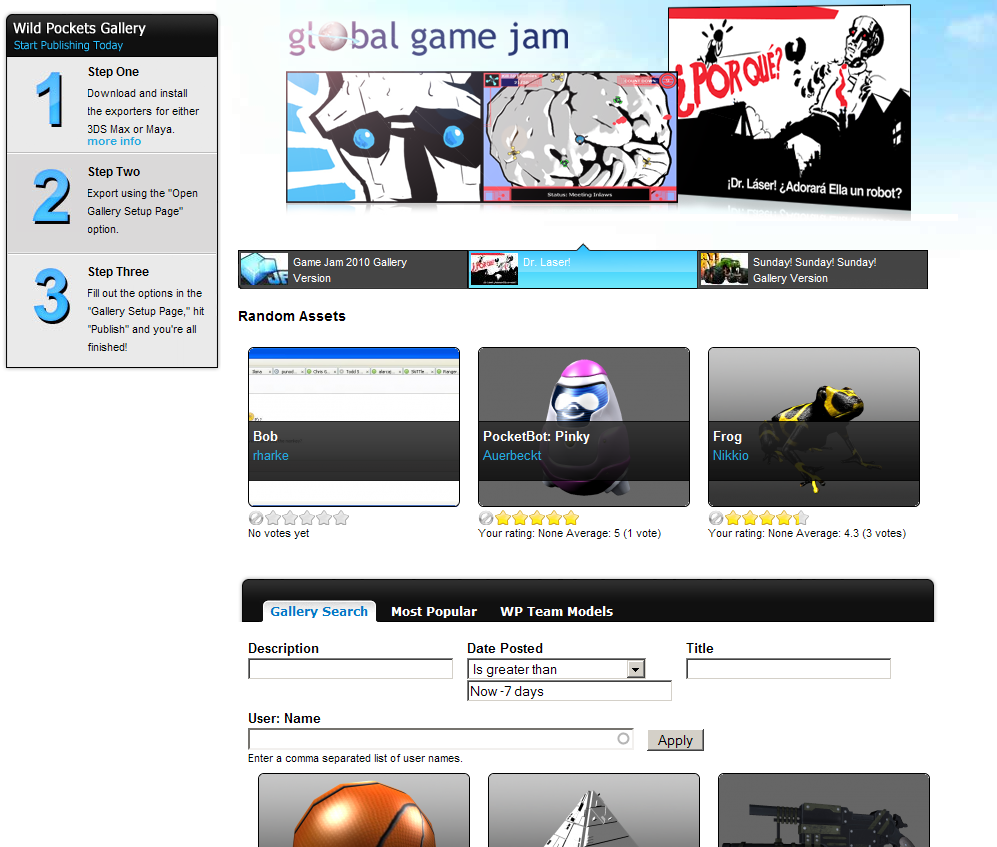
Gallery Page (Beta)
3DS Max Exporter Documentation
Maya Exporter Documentation
How it works in 3 steps
1.) Create your model and download the wild pockets exporter.
2.) Export your model using the wild pockets exporter available for 3DS Max and Maya, Select the "Open Gallery Submission Page" check box in the exporter.
3.) After your model exports a web page will open on the "Publishing Page" of the wild pockets website. Fill out the page with your description, thumbnail image, set your privacy option for your model, and press publish. The available privacy settings are:
Currently the only privacy settings available are 'public' and 'private', but more advanced privacy settings are on the way soon. Here is an explanation of the privacy settings we're planning on supporting:
-
Public: Everyone can see this model and everyone can use it to build new games
-
Private: Only I can see this model and use it to build new games
-
Preview: Everyone can see this model but only I can use it to build new games
-
Custom: Which will be an specialized privacy mode, which will allow you to grant specific 'users' specific 'rights' with your content
Your model is published to the gallery! Now you can find it in the Wild Pockets Gallery, or on your user library in your user profile.
Features to check out:
-
Try exporting a model using the new exporter,
-
Was it easy to figure out the exporter?
-
Were any of the labels on the exporters confusing?
-
Did you successfully export your model
-
Check out the model in the preview viewer,
-
Did the model viewer show up in the web page?
-
Did your content load quickly in the model viewer?
-
Is the interface for the model viewer easy to figure out?
-
What sort of features would you like to see in the model viewer in the future?
-
Try adding the model to the gallery by filling out the publishing page,
-
Were the forms and content on the page easy to fill out?
-
What did you set your privacy option to?
-
What sort of other information would you want to set on your published model in the future?
-
Did you find the publishing process simple to go through?
-
Check out the gallery main page,
-
Did your content show up in the gallery?
-
How do you feel about the popup functionality?
-
Did you check out other user's models in the gallery?
-
What sort of features would you like to see in the gallery?
Things under construction
-
New user gallery library, an easy way to view your published assets from your user account
-
View pages (the page you land on after publishing an asset is there, but lacks anything other than an edit link, and the ability to view the model in the model viewer. Advanced functionality coming soon.)
Thanks, and please let us know if you have any problems!