The Zen theme aims to be the ultimate standards-compliant starting theme for Drupal. The name is an homage to the CSS Zen Garden and its aim to completely redefine the look of a site purely through CSS.
This group seeks to solidify the Zen theme to make sure that it is truly pliable, flexible, and adaptable. We will also discuss and implement improvements and future directions for this theme framework and for Drupal theming in general.
You can also find some of us hanging out in the #drupal-design IRC chatroom.

node.tpl.php overrides
I'm having trouble trying to get template file overrides to work.
I have created node-playlist.tpl.php which refers to a content type called "playlist" created in CCK and placed it in my Zen sub-theme folder. However, nothing I put in this file is displayed for that particular content type and the regular node.tpl.php is used. Am I missing something here or is it just not possible with a sub-theme? I have theme registry rebuild enabled!!!
Any suggestions???
Thanks
Read more
the menu system...
could someone list the different ways to handle the menu system.
for example, there is the $menubar... is there a way to theme that? perhaps some article I could read about how to use it.
also, what are the other options and perhaps some articles about them.
the rest of zen is pretty straight forward so far.
Read more
Redoing my themes in Zen
(cross-post from bloggy)
I started doing Drupal themes with the idea that we could have simple, minimalist themes that can get the job done with little images.
Color.module helped with the eye-hurting colors and Zen just provided an excellent starting point to make a very high quality theme.
<
blockquote>
After having taken a peek into the Zen project and drinking the kool aid the syntax markup and quality is blue skies over here. Color.module and Zen work well in combination. :)
new website primary-sources.eui.eu
Just wanted to show a site I've built: http://primary-sources.eui.eu/
We're still in a testing phase before 'official' launch early october but very curious to what other Zen users say. It's an academic portal meant to be simple and hopefully easy to navigate for users. Any feedback would be very much appreciated!
All best,
Gerben
Zen css Tabs Problem
Hi all
i have been using the zen css for the my site the problem is that when i upload in the server tabs module is not working in the live server but in my local system its working well,can any one help me in giving sol?
i am thinking that it might be due to linux permissions
Thanks and Regards
Ajay Kumar K
clickable regions in a header
Is there a way to define clickable regions in a Drupal header when I use Zen? I know how to code this in html with coordinates but I have no idea how to get it working via CSS...
Best,
Gerben

Road map for 6.x-1.0
This morning I released Zen 6.x-1.0-beta3. It has 27 improvements over the previous release. Full release notes are at: http://drupal.org/node/308618
The features of note are:
- #306856: Optimize code by adding conditional includes. I've reduced the code in template.php that is run on every page in half, which is a significant optimization.
- #308251: Add useful styling for status, warning, and error messages

Ineaguide.org, done with Zen
Hi, just wanted to share with you a site I've done with Zen during my summer holidays.
I have to say that Zen is an excellent base theme, and, as a total CSS beginner, I was surprised how easily I could bend it to my will... The most difficult task was to deal with these f#?!# MS IE 6 and 7 browsers... If it was only for FF or Chrome or Safari it would have been a lot easier...
And last thing, firebug (FF extension) is such a wonderfull tool, especialy when dealing with the so many Drupal stylesheets...
Here it is : http://www.ineaguide.org.
Read more
Post your proposed session for DrupalCampLA 2008
This is easy and quick, nothing fancy, no voting - just post your session idea (title) and your name/contact info and show up to present that day! We have sessions open from 10am-2pm each day (Saturday and Sunday) and each session should plan for 45 minutes each.
http://groups.drupal.org/node/12528 (edit wiki page)
If you can't see or edit the wiki page, be sure to join our group which may be required for editing the wiki page.
Read moreColor.module demo
Hi, I wanted to point you guys to a demonstration of color.module I am working on.
http://www.skiquel.com/lab/drupal-6/ - You should be able to get to try it as 'user' and 'admin', and play around with the scheme functionality.
Read more
Manaaki Solutions Ltd, New Zealand
 This is a zen subtheme I designed for our company web site. Zen is the best theme ever and I am keen to contribute to its success. Check it out at http://www.manaakisolutions.co.nz
path to call CSS for new template file (sorry me again..)
I created a new template file called "page-taxonomy-term.tpl.php", based on the node.tpl.php. The idea is to create a different look for taxonomy term pages. As it turns out the new template file is not associated with any CSS sheet. After looking in the forums I realised I need to call the CSS correctly. Normally this is done by inputting
<?php
 print $styles;
?>how to change info on taxonomy term page (but not node pages)
I would like to have my taxonomy term pages only show the title of the nodes. When I start changing things in the node.tpl.php file the node pages also change which is not my intention.
I found this thread that addresses the topic:
http://drupal.org/node/135130
remove underlining in menus
Sorry for asking something so simple but I just cannot find the solution. I am trying to remove the underlining from links in the menus, I know how to do it but I cannot figure out which style sheet to modify. I tried in the zen subtheme standard sheets, also used Firebug to see (which gave me html-elements which I put in the subtheme folder and enabled in .info file) and system-menus; tried to add "textpdecroation: none;" in several places (links, lists etc) but the underlining is still there.
TIA,
Gerben

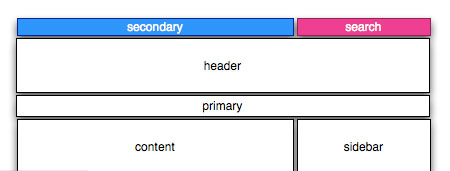
change display of secondary menu without changing HTML?
is it possible to change the location of the search and secondary menu to "appear" on top of header... without changing the HTML?
i can't seem to manage it... this is what i'm trying to do:

3 beginner questions: relative image path / difference layout.css <> foozen.css / 'subtheme's'
Starting with Zen, i come across three problems/questions i can't solve
1) a relative background URL isn't working. Why not? Using an absolute path works fine (like //localhost/drupal/etc), but when i change it to "/foozen/images/bg.jpg" nothing happens. image is stored in //localhost/drupal/drupal63/sites/all/themes/foozen/images/bg.jpg (main zen theme is in //localhost/drupal/drupal63/sites/all/themes/zen). It's not an apache-thing, because other theme's are working fine with relative paths. What is the right relative notation to an image?
Read morehow to change margins etc of mission statement?
Hello,
I am new to theme building in Drupal and just started to work with Zen. So far it all works quite well but for some reason changing the CSS for the mission statement does not work in all cases>
Example:
#mission /* The mission statement of the site (displayed on homepage) */
{
margin: 10px 10px 10px 10px;
font-family:verdana, arial, helvetica, sans-serif;
font-size:13px;
}
If I change the font size here this works. But I can do whatever I want with the margins and nothing happens. Is this overrided somewhere? And how could I change it?
Many thanks,
Gerben

Questioning navigation source order
For the most part, I'm completely happy with the XHTML source ordering for Zen. I love that we've got the content ordered before the sidebars. However, I have to admit that on a regular basis, I have been frustrated by the way that the navigation works (and/or doesn't work).
Read moreusing tabs with zen
Hi
Just starting off with Zen and I like the CSS functionality.
However one question seems not to be answered in the documentation.
When copying the files to a new subsite there's no mentioning about copy of the tabs.css that's in the original zen folder.
Is it not possible to create tabs for primary links?
Regards
Fred
Styling links - Houston there is a problem
Hi folks,
I have built a site for a ngo. It is still on the testserver. You can view it at http://www.einstern.eu
Somehow styling the links does not work and it seems as if I am at the end of my tether.
I am referring to the sublinks of primary links as can seen on the testsite. Klick on About in the horizontal menu at the top of the page. Then a link called Organs appears. I need to style this link, i.e. add some padding and background. But I have no idea which code to use.
Here's the html:
Read more